Showing posts with label Pi-Star. Show all posts

Monday, February 13, 2023

Mumla: Brandmeister The Ever Living


The intent of this article is to provide insight to a limited mobile device to Brandmeister Network experience helpful for those looking for another field capable communications option.  And, if you are a child of the 1980's you will easily understand the villainous image above!

Using the "Mumla" Android or iOS application, you can easily link a few talk groups via Brandmeister for access on your mobile phone from anywhere for limited DMR access. 

Thunder Thunder Thunder Brandmeister?

To get started with Mumla, the Brandmeister team has created an official Wiki to get started as found here:  https://help.brandmeister.us/mumble/mumble-mobile-app-setup 


Snarf!  Some helpful tips

The directions above are pretty easy to follow, but there are a few things that "might" make you get confused such as:


  • Your DMR ID - You MUST use the newer 31xxxxx format ID. Older 11xxxxx will not work.

  • Your hotspot - Make sure you enter in your SSID as part of your hotspot, but I have realized your hotspot does NOT need to be on the network for this to still work.

  • Where does it work?   This will work anywhere you have mobile device coverage
Connecting The All Seeing Eye!

Now that you have set everything up and you connect, you should see something like this on your mobile device. You can then click into the limited list of bridged talk groups and communicate globally.

Be aware that certain ranges of talk groups will not be permitted to be added after opening a ticket with Brandmeister and even then, you will have to have a server configured to hopefully allow you to get added to Mumla.

After some testing, this works rather well as an alternative communication method using my Android and iOS devices.

This will NOT replace anything for me, but its nice to have this set up "just incase" I need it. Plus, it works well with a Bluetooth headset and audio is rather good.

One last note, if you want to see what happens after hitting the PTT button on Mumla while watching your Pi-Star dashboard, make sure you add the talk group to your hotspot so you can see your traffic.


One idea this gives me is getting more SOTA or POTA people in the Hudson Valley on the TriState NY-NJ-PA talk group while doing activations if they have mobile service if something other than a local repeater is needed for spotting and you do not want to use a hotspot while at the park or in the woods.

Now, how about this as our next ham mobile inspiration! 

Friday, December 31, 2021

K2GOG EOY 2021 Loose Ends #3: MMDVM Pi-Star + RPI Zero 2 W Upgrade


My primary duplex hotspot was last reconstructed all the way back in 2018 and has been reliable at home or for select field demonstrations ever since.

Beyond swapping out the SD card and upgrading the firmware, nothing from a basic hardware perspective has changed for almost five years.

With some spare time today as the year comes to a close, it was time to finally upgrade the Raspberry Pi Zero W v1.1 to the newest Raspberry Pi Zero 2 W released earlier in the year as part of my N5BOC based duplex hotspot.

N5BOC, K2GOG, MMDVM Duplex,  Pi-Star Duplex
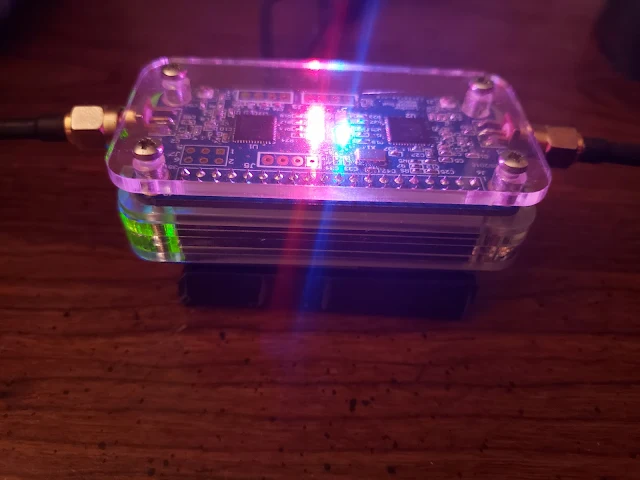
We have the blinky blinks with the hotspot which means its working!
(Photo Credit: Steve Bossert K2GOG)

Computing Differences

As the Pi-Star software package has continued to evolve, it has become evident that the older Raspberry Pi Zero was underpowered with its single core CPU.  

The new Raspberry Pi Zero 2 W has a total of four CPU cores certainly will add more horsepower behind the scenes to my hotspot.

I am expecting a noticeable power consumption increase due to the additional computing power, so this is something I will need to analyze further if I want to take this unit portable.

Raspberry Pi Zero Wireless 2 offers 4 CPU cores which is 3 more than the earlier version. The prominent RF shielding over the Broadcom chip is a notable addition on this latest board which will be popular with the digital voice community looking to upgrade MMDVM hotspots
(Photo Credit: Raspberry Pi Foundation)


Power of the Pi

My N5BOC duplex board has been surrounded by one of the C4 labs laser cut cases for a long while.

Sometime in 2019, I made the addition of a PiSugar battery pack to the bottom of my hotspot to give it some back up and limited portable power.  

This small battery pack is also part of the HASviolet project, so that is why I had a few more on hand.

I am not expecting this this small 3.7v 1200 mAh battery will last now, so will have to do some tests.  

The reason I like using a PiSugar is that if by chance there is a power surge since I operate a hotspot remotely, this gives me some additional protection. 

PiSugar battery pack
(Photo Credit:  PiSugar Git Page)


From a full charge when running the older RPI Zero, I would get about 4 hours run time, so I am expecting maybe half that with the more power hungry RPI Zero 2.

The normal USB power supply  at home I use is rated at 5 amps, so I will have to consider doing some measurements on current draw over the next few weeks to see how the RPI ZW2 compares to the older RPI ZW1.  

Surgery Upgrade

If you have experience with the C4 Labs cases, you probably know it took practically no time to solder on a new 2x20 header to the RPI Zero 2 compared to putting the case back together.

No changes to my SD card image needed to be made which was already running the latest version of Pi-Star. I simply put the SD card into the new RPI and everything worked right away after connecting to the new IP address.


N5BOC, K2GOG, MMDVM Duplex,  Pi-Star Duplex
While running "sudo pistar-update" after moving to a fresh install
of Pi-Star on a Raspberry Pi Zero Wireless 2
(Photo Credit:  Steve Bossert K2GOG

Then there was a problem....

While I did run "sudo pistar-update" and "sudo pistar-uprade" on the RPIZW1 prior to switching over to the new RPIZW2, after an initial play around, I ran into an issue when doing same update/upgrade on the RPIZW2 and needed to start with a fresh install of Pi-Star in the end since I could not log back in are connect over LAN.

Lessons learned over the years, when in doubt if you can not solve the issue in under 10 minutes, just start with a fresh pi-star image.


N5BOC, K2GOG, MMDVM Duplex,  Pi-Star Duplex
Ran sudo pi-star update for a second time to ensure all packages were up to date
(Photo Credit:  Steve Bossert K2GOG)


So, I ended up flashing a fresh version of Pi-Star and did the upgrade and update paths and ran into no issues. I suspect there was something with a buster based dependency issue or kernel specific anomaly. 

I would suggest just starting from scratch in my opinion to remove any gremlins that will happen at an inconvenient time. 

Keep running sudo pistar-update and or upgrade until everything seems fine before you go and program the pi-star specific things you need like frequency, modem, callsign, etc.


N5BOC, K2GOG, MMDVM Duplex,  Pi-Star Duplex
Even though everything was thought to be current after moving to Raspberry Pi Zero Wireless 2,  running sudo pi-star upgrade uncovered some additional packages needed by the newer Raspberry Pi.
(Photo Credit: Steve Bossert K2GOG


Was it worth it?

For $14.99 thanks to a recent trip to Micro Center, the upgraded horsepower now part of my Pi-Star MMDVM N5BOC hotspot seemed like it was a great idea.


K2GOG duplex hotspot made from a N5BOC duplex board,  Raspberry Pi Zero Wireless 2 and a PiSugar battery all contained in a C4 Labs case. One of the USB wires is for power that plugs into the PiSugar. The one is for a GPS that plugs into the OTG port on the RPI Zero Wireless 2.  External 433 MHz mini mag mount antenna are connected via the SMA ports.
(Photo Courtesy:  Steve Bossert K2GOG)


Thursday, September 16, 2021

Pi-Star: Sharing your public hotspot


Have you noticed that HVDN has not posted much about DMR or even things relating to the different digital voice modes for a while?    Did you look closely at the photo above for some laughs?

Our focus has been on community growth and awareness via the massive June Hudson River Radio Relay event, a mini QRP HVDN field day, helping to support the USMA at West Point triathlon via APRStt this past August and most recently, spending the day at the Old Rhinebeck Aerodrome to support the OMARC K2A effort.

Plus, with a new weekly commitment to support UNDR Net, there has not been much free time to do much else this summer as HVDN prepares for a series of fall season events. 

A reminder from Brian W2BRM today that we have not chatted in a while, made me think I should go find something interesting to write about related to Pi-Star as I try to find the time to do a short video about a duplex hotspot to be included in Pete N2MCI's upcoming presentation about the basics of hotspots to the OMARC club coming up in a few weeks time.

Public Hotspot

Many people are afraid to touch certain buttons in Pi-Star, but I am not one of those.  Most people use a hotspot to just provide communications for themselves which means your hotspot is in private mode and only lets a radio programmed with your DMR ID to use your hotspot.

If you click the button under "General Configuration" from private to public, here is what will happen.

Up until recently, changing to a "public" hotspot would allow for anyone to use your hotspot.  This is helpful at public events as an example if many people have a DMR radio and it makes sense for them to all be on one hotspot for internet communications, while local use can take place via a standard simplex channel.

If you want anyone to be able to use your hotspot, leave the "DMR Access List" box blank.

Alternatively, you can add a list of DMR ID's separated by a comma which would allow only your closest trusted friends to also use your hotspot.

Be sure to remember to hit "apply changes" when adding or deleting DMR ID's. 

Bigger picture use case

Now, lets say your club has a DMR repeater that is managed by a Pi-Star interface on your favorite DMR network like Brandmeister or TGIF.  Using this feature could be helpful to ensure that only members of your club are permitted to use the DMR repeater instead of anyone else.  

While this can be considered exclusionary and not the best way to portray amateur radio, this feature may be helpful to help promote the use of certain talk groups on a repeater rather than a hotspot. Should an issue happen where preventing a specific user is needed, this feature can permit that also.

There are many ways this feature can be used, so feel free to share some comments below on how you may wish to use this or not.

-Steve K2GOG & HVDN Team

Wednesday, September 4, 2019

GD77: The first HT based Pi-Star hot spot


As mentioned here in the past, Roger Clarke is the wizard down under. He is known for his Git repository making the firmware upgrade procedure on MMDVM boards pretty painless and also his work surrounding an open source CPS for the GD-77 DMR radio.

For much of the summer, he has been working with Kai on turning the Radioddity GD-77 into a hot spot which is probably the most exciting thing I have come across recently.  This is such an amazing case of open source software at work and making closed hardware, much more open.


Head on over for a read on Roger's blog for much greater detail and get ready for some fun. My biggest questions are:

  • Will this work with the Baofeng DM-1801 and other ODM variant radios?
  • How will this impact the "hotspot" market and prices?
  • Will other radios see similar innovation (Alinco MD-5TGP, Anytone 878, etc)

Continued Reading:

Tuesday, March 26, 2019

Presentation: Digital Hotspot Pi-Star MMDVM Hardware Overview

Joe N1JTA gave a presentation as part of a workshop at the Trenton Computer Festival on March 23rd.


Billed as the world's oldest computer festival,  TCF19 was the 44th year in which many hobbies converged which show how ubiquitous computers and wireless technology has become.

There is more detail about TCF on websites such as Hackaday and the official event website here.

What made Joe's presentation unique was that it focused only on open source hardware and some best practices and purchasing tips to guide newcomers into a less frustrating entry into the world of digital voice amateur radio technology.


N1JTA also focused on how the MMDVM and Pi-Star combination is an excellent learning tool for those interested in deploying a wide area digital mode repeater, but would like to first experiment on a much smaller scale thanks to a digital hot spot.


Check out the full presentation below and hopefully this enables further learning about one of the most modern incarnations of amateur radio.

Sunday, June 3, 2018

MMDVM JumboSPOT board: Mods you may need


This is the JumboSPOT board that was/is sold on ebay and other online places. This board along with a Rasberry Pi Zero and a SD card loaded with PiStar makes up a Digital Radio Hotspot.

Depending on when you purchased your board and for what price, you may need certain modifications. The following mods have ONLY be tested / verified on the above board. As with anything in life, you take on the risk and responsibilities of preforming these mods. If you don't know what you are doing, STOP and don't do it!

Antenna mod

If you installed the SMA connector at P3 and plan to use the included SMA external Antenna you need to remove the cap ( see A in above picture ). This removes the connection to the internal ceramic Antenna ( not shown about ) at AE1. Bottom line is that you should not run two Antenna's so removing C28 makes sure that only Antenna is P3.

Flash FW mod

Most early boards shipped with only the 10 pin connector soldered as in the above picture. This meant that you were unable to flash updates to the STM32A103 microcontroller chip. Thus the two pins in the above picture ( marked B and in the red rectangle ) need to be connected to the Rasberry Pi's GPIO pins 20 and 21 which will be right below them.
It is a direct pass through, NOT a jumper as most people assume. So you just need to add a female header to your JumboSPOT board and a male header to the Raspberry Pi. Current boards place a 10 pin female header on both sides of the JumboSpot, which will work, but only thoes two pins are needed. Once the pins are connected you will be able to use the PiStar Firmware update script to update your JumboSpot to the latest version of HS_HAT which is displayed on the PiStar admin page.

OLED display mod

If you just purchased the JumboSPOT board it most likely did not come with an OLED display. You can add one later on if you like. Just look for " 0.96" I2C IIC SPI Serial 128X64 White OLED LCD LED Display Module for ArduinoG9K " or similar. The display gets connect to the top row in the above picture ( refrence "C" ) and not the bottom row that is marked. The main issue is that the pins must match the board pins which are listed above. From left to right they are [3.3v] [GND] [SCL] [SDA] So since you solder the display so that it's facing out the screen you purchase should match that config like so:
 I was able to find this module for 450% less then the ones listed as compatible to the JumbSPOT so don't get fooled by the seller, you can use compatible modules as long as it has the correct pins and supports "I2C IIC SPI Serial". Also note that the display will NOT turn on unless you have it configured and PiStar attaches to a server on the Internet ( as in Brandmister etc ). In PiStar http://pi-star.local/admin/configure.php make sure you have it configured as in:


Adding Ethernet to your Pi Zero mod

This one requires no-soldering! Just chose the correct part from eBay or your favorite Chinese vendor. The PiStar distribution will support an Ethernet adapter out of the box. It's even smart enough to use Ethernet over WiFi and fall back to WiFi if Ethernet fails. But which one to get. If you search for "MMDVM Hotspot Ethernet Adapter" you will be paying the most you can pay. If you look for "Micro USB 2.0 to Ethernet 10/100 RJ45 Network LAN Adapter" you will find ones EIGHT TIMES less! Make sure that it supports Linux and you will be safe. Also I suggest getting one more then you need. When I ordered three, only two worked. Since I only needed two it was worth buying extra ( these parts are really REALLY cheap and cheaply made ).

What do you think?

Please leave constructive comments. If you have mods of your own please share. Like most of you out there I was attracted to this hobby because I could MOD things, make them better! So pitch in and share your knowledge!

Tuesday, May 29, 2018

That was quick. DMR to NXDN


It only took less than 48 hours for the fantastic Pi-Star and MMDVM development teams to release the ability to translate DMR into NXDN.

It's time to update your ZUMspot, JumboSpot or whatever other "spot" device to give this latest feature a try.


Color Change on Pi-Star

Has the red, white and gray color scheme on Pi-Star sort of worn on you?  

If it has, one of the latest feature additions to Pi-Star is the ability to change the coloring to your liking thanks to the "CSS Tool" that came part of 3.4.14.

On something a bit more technical, there is also the ability to do cross mode translation from DMR to Yaesu Fusion. This means, you can now take your DMR radio and talk across to Yaesu Fusion users. This was only possible on the Shark RF OpenSpot device previously.

In version 3.4.13, we saw the ability to go from Yaesu Fusion into DMR, NXDN and P25.  In 3.4.14, it is now possible to go from DMR to YSF. Will NXDN or P25 be far behind?   And, no one cares about D-Star anymore anyway.....  Just saying...  :)

Pretty Colors

You can navigate to this "change the colors" tool by going to "Configure", "Expert" and then under tools "CSS Tool"

Alternatively, you can also navigate to your Pi-Star dashboard with "/admin/expert/edit_dashboard/php" after your local IP address


To change from the standard red "ffffff" background to the teal "6497b1" all you have to do is change as per image.  To figure out how to edit hex into colors, here is a handy website:  http://www.color-hex.com/ 

Infusing Fusion with DMR

The list of cross mode translation keeps growing and the DMR to Fusion is the latest. Its now possible to go Fusion to DMR and DMR to Fusion which is real nice.


All you have to do is set your DMR radio to talk group 7 and configure the below new setting to go where you want it in order to access that part of the Fusion network.


YSF Startup Host will offer you may options.  APRS Host is if you plan to use location or message sharing functions.


Wednesday, May 23, 2018

Upcoming HVDN MMDVM Hot Spot Project

Here is a preview of an upcoming HVDN project involving a full duplex multi mode digital hot spot for use in the car or in person demonstration.


Subscribe for HVDN Notebook updates only 

Tuesday, May 8, 2018

Why Update To Pi-Star Update 3.14.3?

Most of the folks involved with HVDN agree that DMR is the digital voice mode that is spurring on massive growth in the hobby compared to Yaesu Fusion (C4FM) and Icom D-Star (GFSK) digital modes.

This HVDN article talks about Pi-Star
version 3.14.3 and its new cross mode features

Other digital voice modes that amateur radio operators are experimenting with include NXDN and P25.  While Fusion and D-Star were developed just for amateur radio use, DMR, NXDN and P25 all started life as commercial standards.  DMR was the first to see "ham grade" equipment for sale and truly sparked the digital growth we see today.

DMR is an open standard and many new vendors took advantage of this and started to offer radios at budget price points to spur experimentation with radios marketed directly towards the amateur radio community.   Traditional "ham equipment manufacturers" such as Yaesu and Icom pretty much missed the boat by continuing to push closed standards, with Icom having a very high licensing rate of its D-Star technology built by the Japanese Amateur Radio League almost 20 years ago. The only vendor who paid to get on board with Icom's D-Star is Kenwood with its 2016/2017 released $500+ TH-D74 radio.  Limited options and expensive equipment has kept many away from D-Star as a result.  Yaesu has fared a little better, but really not by much until recently with new affordable equipment.

All These Acronyms...

There is a comparison of the different modes mentioned above at the bottom of the "Basics of DMR" page on HVDN for those interested in more details as it gets confusing quickly for some people.

Because of all these different digital modes, different radios can not communicate with each other and take advantage of benefits and featured offered by digital technology compared to analog FM or NFM. Analog FM equipment is what has been the dominant amateur choice of non-HF radio for at least 40 years and digital migration is kicking and screaming its way into the amateur radio community. A universal digital standard is needed to truly replace FM.

Your very own repeater? Sort of...

The SharkRF OpenSpot was the first "hot spot" type device to provide cross digital mode support.  What this meant was a DMR based radio could talk on the D-Star network to other users with D-Star radios.  It also provided the ability for a Fusion radio user to talk on parts of the DMR network.

SharkRF Openspot was the first cross mode capable hot spot
device to see mass adoption by amateur radio operators


With DMR radios such as the TYT MD-380 or Radioddity GD-77 costing less than $100, it gave many amateurs a taste of what 80,000+ individual users already registered to use and also be able to talk to those with just Yaesu Fusion or Icom D-Star Equipment to see if they are missing anything.

Converting analog FM repeaters is not always the best option for those looking to add digital repeater capabilities to a specific area, so "hot spots" have found a unique niche to fill the gaps while owners of great sites for repeaters decide what to do when thinking about what digital modes to support for wide area coverage to eventually replace much of the FM based repeater infrastructure.

One of the latest "hot spot" devices provided by a community of developers. This MMDVM board
provides simultaneous transmit and receive or "full duplex" operation. It is like a "mini repeater" 

Pi-Star & 3.14.3

Another "hot spot" type of device based on open source design is sometimes known as the ZUMspot, JumboSPOT, ChinaSPOT and a number of others.  The team behind Pi-Star took somewhat more "scary" command line interfaces and made things easier by way of nice visual interfaces. These all mostly run a user interface called Pi-Star and the latest revision does something very interesting.


Version 3.14.3 allows anyone with a Yaesu Fusion radio to also communicate over DMR, NXDN and P25 now. This is pretty monumental where now that Yaesu has some lower priced new Fusion radios such as the dual band hand held FT-70DR or higher powered mobile FTM-7250DR, users an now use the inexpensive Pi-Star driven hot spots to connect with users of NXDN and P25 plus of course those on DMR. It also lets someone who may have purchased surplus commercial NXDN or P25 radios communicate over DMR or Fusion.

Turn in 1000 Feet: Excitement Ahead

Could these largely community and developer driven efforts be just what some of the more well known amateur vendors need to take advantage of?  Notably absent is any form of Icom D-Star anything in this latest revision.  Kenwood sells commercial NXDN equipment as well as P25.  Icom also sells commercial P25 equipment.  Yaesu's sister brand, Vertex, also has P25 equipment on the market.

One great example of a community member working with a commercial vendor is Ty,  KG5RKI who has alternate firmware available to increase features in certain radios.  Retevis partnered with him to officially support his work.  Will we see Icom, Yaesu, Kenwood or even Alinco take a similar approach?

Could DMR just be the entrance ramp towards a NXDN or P25 amateur future?

All these digital modes also do much more than just transmit voice. They can also be used to share GPS location and text messages in the same narrow frequency bandwidth used, some at the same time as voice communication.

From just May of 2017 to today,  by May of 2019 it should be interesting what else continues to see development and what commercially made equipment comes to market.

Updating to the latest 3.14.3 release is as easy as logging into your pi-star interface, going to "expert" mode and then to the SSH function.  After providing username "pi-star" and your password or default "raspberry",  type in "sudo pistar-update" and then after that completes, run "sudo pistar-upgrade"

Please note that you may need to modify certain hot spot boards to allow firmware upgrades, but you should find no shortage of those with knowledge to help you along the way.

Sample Resources


  • In Person:  HVDN will start having in person meetings in Rhinebeck, NY later this summer once the location completes construction.


Join HVDN for FREE for the first year. Details here.


Wednesday, May 2, 2018

Bigger Display For Jumbo/China/Covert/

The small OLED display that comes as part of the ZUMspot and its spawned derivatives is not a good size for use in the car, so here is how to add a larger display to your hotspot.

Just the beginning of using a Nextion Display


The small OLED display...


First, a few helpful tips....

Be careful what you buy! Nextion and TJC displays look the same, but are not the same! Some are marketed as Nextion compatible. Just be sure you know what you purchase. Nextion is an international version and TJC are China only. 

If you speak/read English, you may want to customize the screen layout, be sure to purchase a Nextion original and not the TJC one, unless you want to learn to use the same editing software but in Chinese.  

Think carefully about what size display you want. The available sizes for TJC and Nextion displays  have some different options, probably to help avoid confusion for buyers. Same with part numbers.

Nextion Display Size Options


TJC Display Size Options


   TJC Display Editing Software - http://tftdata.tjc1688.com/USART%20HMI/USART%20HMI.rar


Wiring Up the Display

The Nextion and TJC displays often come with the mating connector for the display and pin connectors that fit on standard headers in use on Raspberry Pi and other devices. Here is where you connect those wires to the Nextion named set of four pads.


Creating An Image Overlay

The Nextion and TJC displays offer two different way to get a file like the below loaded into the display. All that is being sent from your JumboSpot type device via the TXD and RXD wires is data that relates to where it should show up on the display. 

Easier:  Use the micro SD card on the back of the display to load an image to the screen.


Harder:  Connect and upload the *.tft or *.hmi files via a SSH connection. Not providing instruction for that here.

Screen Sample

Here is what a sample screen would look like for use with the JumboSpot or similiar type of hotspots. However, this same sort of display can be added to any other hotspot or repeater controllers that are based on the Raspberry Pi.


There are existing screen files on a Facebook group for different size displays to use as starting points for your own customization.


Getting The Screen To Work with the JumboSpot

Log in to the Pi-Star interface and change a few parameters.


That should be it. Its a somewhat intuitive process to get this working. Any stumbling block may be spent more on picking the right size and manufacturer screen and finding an overlay you like best or making your own. 

Enclosures

There are 3D printed inclosures available on E-Bay for different size displays as well as for those ready made to work with the JumboSpot. 

HVDN Show and Tell

After a few set backs, HVDN is proud to announce we will start having formalized in person meetings later this summer in the Rhinebeck, NY area. There will also be a rotating quarterly lunch or casual gatherings across the Hudson Valley for those who can not make the monthly meetings.

Please become a member (free) for updates on meeting schedules and other events for HVDN

Joining HVDN offers the following benefits