Friday, July 19, 2019

Part 1: 10 GHz on a Budget


The HB100 microwave module has been around for a number of years. This inexpensive 10 GHz device is more often used as a motion detector, but is easily re-purposed as a transmitter, receiver, or both at the same time for all different types of signals, wide or narrow.

Amateur radio operators have a luxury that other hobbies that involve some form of wireless communications do not have.  With over 23,000 MHz of spectrum available via the easiest to obtain "Technician Class" license in the United States, there is a much wider world to explore.

Moving forward with amateur 3 cm band communication

Between 10,000 MHz and 10,500 is the 3 cm US technician amateur radio license band that falls into the SHF spectrum segment.

There are some interesting neighbors adjacent to the amateur spectrum according to the Federal Communications Commission (FCC) spectrum chart excerpt below just to see how in demand and valuable this spectrum is.
Here is a list of things you will need to get started to receive signals on 10 GHz:

  • Appropriate cabling to hook this all together

Above links are just suggestions. The most critical things when shopping for above include:


Power Supply: The power supply must be capable of an output of 13 and/or 18 volts. The LNB changes antenna polarization based on the voltage powering it, so a supply capable of this range is required. A fixed voltage power supply would be best however in order to not damage your LNB.  Many laptop computer power supplies can easily re-purposed for this with appropriate additional circuitry.  Just be careful when making adjustments with a variable supply as going over 18 volts may damage your LNB.

Bias T:  The RF DC Bias T allows DC power to be sent one way to power the LNB while blocking the DC power from being back fed into your USB SDR receiver.  Being sure to follow proper connection direction is critical to not damage any of your 10 GHz equipment and also, your computer which will NOT like 18 volts being sent into the SDR and possibly into your laptop USB port. It is worth noting that the RTL-SDR v3 does have a built in DC bias T, but is not capable of outputs anywhere close to what the LNB needs.

LNB:  The LNB is what converts the 10 GHz signal down to a lower intermediate frequency that can be received by your SDR between the 600 to 900 MHz range. It is far easier to send this signal over common 75 ohm coaxial cable over 100 feet into your Bias T and then into your SDR than trying to transport a 10 GHz signal cheaply. 

Beyond above three items, the appropriate cabling for power and feed lines are needed.  Do not use multiple RF adapters to change from connections like SMA to BNC to BNC to F as you will lose precious signal as a cautionary note.

Optional, but mandatory once you get things working for short range is to use this  receiver with a dish antenna, such as the easily found "Direct TV" or "Dish Network" artifacts via Craigslist, Facebook Market Place and many other local sources. The dish will help concentrate signals for longer range reception or communication.

Your finished 10 GHz receiver should look like this:


10 GHz ham radio


Software for receiving 10 GHz signals

Here are where things become a matter of preference as there are many different software packages that will work for 10 GHz.  One of the easiest programs to get working is called SDR# where a more advanced and capable application is SDRangel, which also includes native video reception.

A list of software to be mindful of includes:


sdr#, SDRangel, GNUradio, sdr


What about that HB100?

Sometimes it is easier to start with the harder part and that was the receiver component for those interested in 10 GHz signals. The good news on the transmitter part is that it is easy and cheap to make a basic transmitter capable of voice or video transmission.

Inside the HB100, is a rather simple circuit but very complex design.


All of the traces on the PCB and placement of the few components all play a part in how the HB100 actually functions. Here is a schematic description courtesy of All About Circuits.


By simply adding a signal that can ride on top of the power supply source, you can easily modulate the HB100 with either voice or video signals.

A simple circuit that provides regulated power, audio pre-amplifier and modulation for the HB100 is referenced below from the presentation "Build a simple 3cm transmitter" created by Cor Rademeyer, ZS6CR in 2018.


In the second part to this article, we will explore sending video signals with the HB100, increasing antenna efficiency and other reasons to experiment with the 10 GHz spectrum with or without your amateur radio license.


------


Some recent popular SDR related HVDN Notebook pages


Saturday, July 13, 2019

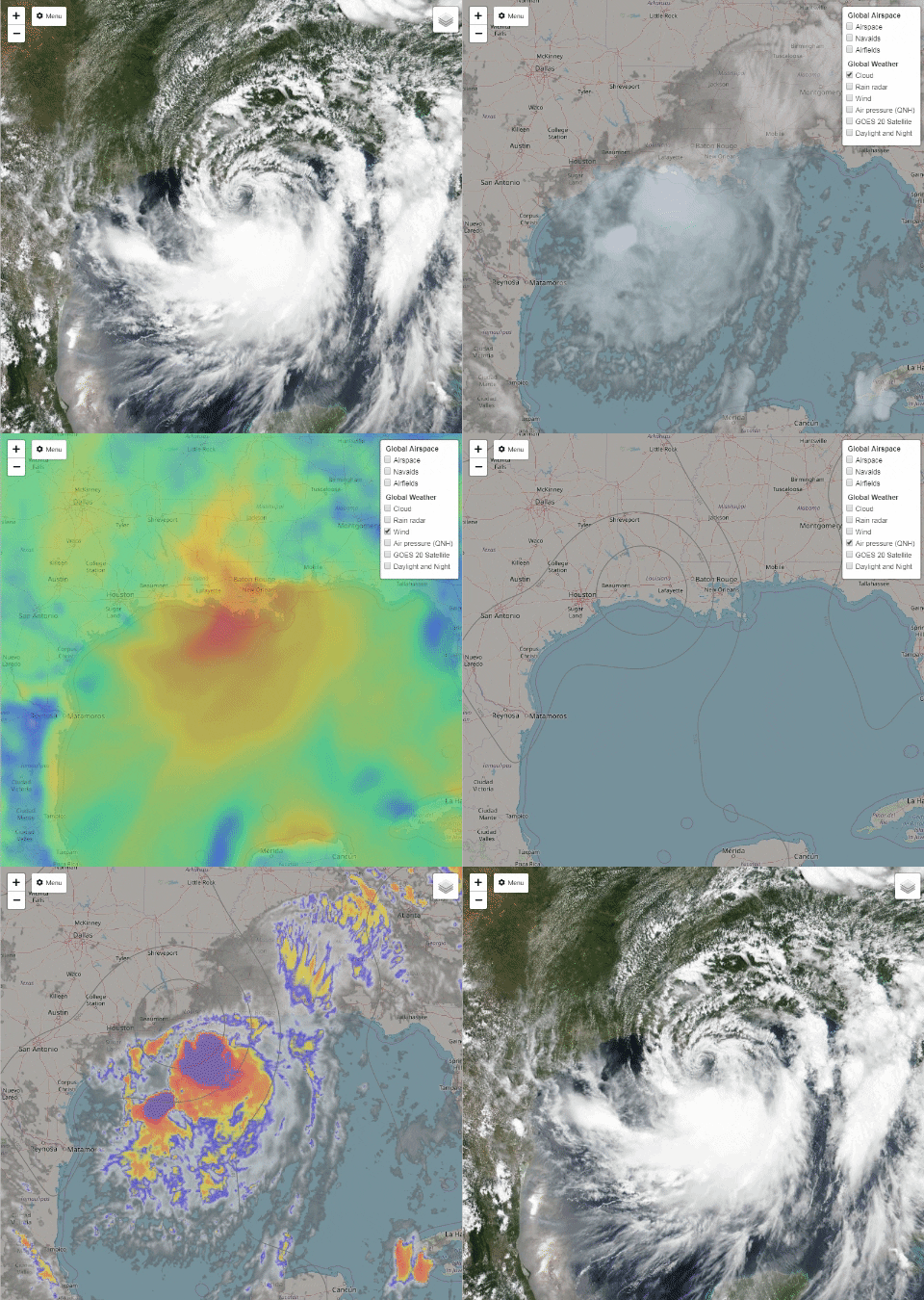
Tropical Storm Barry: Weather & Aircraft

Hudson Valley Digital Network (HVDN) integrates various real time weather imagery into our ADS-B based air traffic server detailed here.  Currently, the Hudson Valley is experiencing beautifully clear weather this weekend which is great for flying.

However, the Gulf Coast area soon to be affected by Tropical Storm Barry will not share this with us here in New York.

Current imagery generated at 16:30 Eastern Time, July 13th 2019.

For access to the HVDN ADS-B system with integrated weather feed, please consider making a small donation. Proceeds collected over the next week will be aggregated and donated to a deserving organization in the storm affected area. All who donate will receive 6 months of HVDN ADS-B access.

The HVDN membership hopes those in the storm affected area will be safe once the storm makes landfall.


Friday, July 12, 2019

Easy SDRangel: Windows Executable

Been a fan of Evariste's SDRangel project for a long while now and it has been hard to convince many how amazing his opensource wizard work has been.

Unless your a Linux master, which I am not, you had to figure out how to find an already compiled Microsoft Windows version in the Git repository or get all the right dependencies working under Ubuntu or whatever Linux distribution you roll with.


sdrangel windows monkey hvdn


Well guess what?

Rather than than go here: https://github.com/f4exb/sdrangel/releases and look for the correct links and follow instructions like this old HVDN December 17th 2017 article entitled "SDRangel & Decoding Digital Voice (DMR, D-Star, Fusion, etc)", how about we just cut the bull and give you what you have wanted for so long dear SDR fans.

With SDRangel v4.11.0 you can now just grab sdrangel-4.11.0-win64.exe

This will install just like any other Windows application on a 64 bit modern machine and I need to say,  the final result is a very, very responsive piece of software.


Installed, now what?

If you have an el-cheapo RTL-SDR dongle from China for under $9 USD or the much better quality and legitimate version RTL-SDR v3, Kerberos SDR , any of the Lime SDR products, Hack RF, etc you will be able to use them all easily with SDRangel v4.11.0, even all at the same time if you want!

Lets start by making sure SDRangel will find the SDR you have plugged into your computer. Yes, do that now and then click where the arrow points to. The example below is with a generic USB SDR dongle.


Monkey see, monkey do

Now that you have things installed and selected a demodulator, time for some fun. You can do the following:

  • Listen to stuff 
  • View stuff
  • Visualize stuff
  • Decode stuff
  • Record stuff
  • Stream stuff

Lots of stuff. Have fun with SDRangel on Windows. Do we need more of helper monkey at HVDN? 

Thursday, July 11, 2019

Yaesu FT-3 Instruction Manual Review


Perhaps HVDN will start a new trend where we do a review of instruction manuals and everyone else follows along. Lets start this amazing idea off with the FCC approved Yaesu FT-3 radio manual now available.

FCC ID:  K6620725X20 Manual Review

So many products today in amateur radio land almost seem to ship with little documented information on how to use them.  As digital voice radios continue to get more complex, there are "certain vendors" that do not put any effort into a decent instruction manual.

Yaesu is one vendor that actually does put forth good effort in trying to document almost every function, quirk and specification possible, so we thank you very much for that.

This article will hit on a few interesting nuggets found in the new Yaesu FT-3 C4FM capable dual band hand held radio.  We will not discuss the "how to install the battery or hand-strap" unfortunately.


As predicted with absolute precision all the way back on May 28th 2019 in our "FCC Update:  FT-3 cleared for launch" article, the instruction manual would be made public for our eyes to gawk at on July 10th.  A much better version will soon appear on the Yaesu website though, so please be aware of that.

This basic manual is not even available on Yaesu's website yet.  For anyone ever complaining about government dysfunction, the person responsible for pressing buttons at the FCC is doing a great job.


 Lets Review Page....


The really fantastic thing about page 11 is that Yaesu is pretty much telling us specifically that battery life will be near horrible with this radio just like the brochure pointed out so we all knew what we were in for after the $500 investment involved in acquiring a Yaesu FT-3.

For those interested in UHF operation, perhaps changing over to VHF would be a better experience for anything requiring slightly better battery life.  The Yaesu FT-3 out of the gate sounds like a great radio to mostly listen versus talk for any length of time, which is OK because most repeaters have very little traffic on them these days or do they?


This is the Yaesu FT-3 radio that this
article is focused on, of course.


Who ever is selling VHF capable hot spot devices should increase prices now to reap the benefits of Yaesu publishing this specification.  Quite a bit of activity can be discovered globally by using a Fusion radio with a device like one of many Pi-Star based MMDVM devices or the Open Spot 2.

The older Yaesu FT-2 battery will also fit the FT-3 which is nice, so stock up on those now before those get scarce in case third party vendors stop selling them or stocking aftermarket versions.

This is the Yaesu FT-2 which lacked C4FM
and a color screen found on the new FT-3


Vendors who sell the Anytone, TYT and Radioddity gear have for a few years now been running great deals on packages that include a spare battery, but we will likely never see Yaesu, Kenwood or Icom ever do something like that even if you purchase a $500 USD radio.

The last note on battery life is,  do not go anywhere with your new radio. The manufacturer is clear that any disturbance such as a warm fart or brief trip to the outhouse while playing ham radio may reduce the life of your battery.

The ability to receive in AM mode is actually a major benefit so that you can listen to aircraft communications in the VHF 118-136.995 MHz portion.  There is no voice communication in the 108  to 118 MHz segment as that is reserved for navigational aids.

The "hidden feature" is the ability to swap to AM in the 138 to 144,  148 to 150 MHz for military "air to air" or "air to ground" communications.   The same holds true within the 225 to 400 MHz band which is considered the domain of military operations around the world, including these big guys flying out of Stewart Air Force Base right here in the Hudson Valley of New York and tracked using the HVDN ADS-B monitor.  The FT-3 can only monitor voice transmissions in the above mentioned frequency range and not the 1090 MHz or 978 MHz transponder signals which is what ADS-B is for.


Not everything in this band segment is AM though, so having a look at the UHF Satcom website for other ideas might not be a bad idea when there is no activity on the 2m and 70cm ham bands.

Compared to the Kenwood TH-F6 and TH-D74, there is no SSB mode on the Yaesu FT-3, so HF monitoring will be limited to only AM broadcasters or the rare AM enthusiast on the 80m or 10m bands.

Lets skip ahead a bunch of pages to talk about a feature involving the use of Yaesu Fusion which is the digital voice mode they have adopted.  The above graphic shows some interesting use cases for the advanced calling function which may help use one frequency for many users at the same time.

In the 1990's there were many radios by different vendors that offered selective calling features not too different than this. Yaesu is touting this as a major feature of the FT-3, but your use will be limited to only people with a Yaesu radio with the same feature.

Back in the day for example, the Yaesu FT-530 was top of the line and funny enough, commands a price used on par with that of the FT-3 smaller sibling known as the FT-70. Neither new radio supports the cool external display speaker microphone though, but the FT-3 does have an option for a microphone that can take and send pictures, with images view-able on the color screen on this latest Yaesu radio.

The FT-530 was a great radio.
Does it not look like fun to use?


Right now the only other handheld Fusion radio is the FT-70, which retails for less than $160 USD and offers all the same C4FM functionality as the $500 FT-3 radio.  It is not clear if these extra selective calling features or picture sending option will help sell these radios except if there are groups buying in bulk and require these functions for some reason along with the appropriate accessories.


Here is more detail on calling functions in the menu system along with a really nice abbreviation for "Weather Alert"  which is a US market only feature that will certainly see more use compared to the different squelch, DTMF and Bell features. For analog FM ham radio use,  tone and to a lesser extent, DCS will also see a lot of use for FM analog repeater use.


There is plenty of detail on one of the stand out features of the FT-3 which sets it apart from the FT-70 which is APRS. Using 1200 baud data packets, the user can exchange location details with other users along with sending text messages. The APRS feature set can be used to communicate to any APRS radio including those produced by Kenwood, Alinco, Icom and the new Lanch HG-98 radio at a very affordable price.

Its worth noting that the FT-3 can store multiple paths for APRS which is helpful for those interested in satellite communications and may use "ARISS" to bounce off the International Space Station digipeater when it is powered up or any of the APRS capable LEO satellites such as NO-84, NO-44 and PSAT2. 

The FT-3 is also capable of high speed 9600 baud APRS  which is what Falconsat3 uses and requires a path setting of PFS3-1 rather than the normal WIDE1-1, WIDE2-1 settings for ground based use.


Have you ever wondered what the "Mode of Emission" is and why a vendor can not simply decode it for us to understand what they are for?  Here is what modes the Yaesu FT-3 can decode for your listening pleasure:

  • F2D means (F) Frequency modulation + (2) One channel containing digital information, using a subcarrier + (D) Data transmission, telemetry or telecommand (remote control).  This all works out to the so called C4FM Fusion mode but could also apply to APRS signals too.
  • F3E would work out to (F) Frequency modulation + (3) One channel containing analog information + (E)  Telephony (voice or music intended to be listened to by a human).  This is also known as "analog FM"
  • F7W to close out means (F) Frequency modulation + (7) More than one channel containing digital information + (W) Combination of any of the above. This means the FT-3 could while using C4FM based Fusion could handle some sort of data and voice at the same time but split across multiple channels. 
While that helps understand what can be received, on transmit the FT-3 has even more to offer as we will soon see.


Beyond the already explained F2D, F3E, F7W modes the Yaesu FT-3 can also transmit F1D which is frequency modulation with (1) One channel containing digital information, no sub-carrier and (D) Data transmission, telemetry or telecommand (remote control).  This is what APRS is technically defined as.  The F7W mode is also defined as 4 FSK (C4FM) which is the fancy way to name Fusion.

What did we miss?

What I was really hoping to learn was possible to do some level of programming remotely via bluetooth of this new radio.  Right now, that looks like a big fat no and a reason that the Kenwood TH-D74 is a good purchase even though it supports D-Star, also known as F7W but totally different.  The Kenwood can however receive J3E, A3E and A1E modes.  You can look those up right over here thanks to Wikipedia.

The advanced FT-3 user manual

Lets just stop right there. The advanced manual is not yet out, but why not go out grab a copy of the existing basic manual from the FCC, Yaesu website or better yet, right here for convenience since we know you will not really read it anyway.