Showing posts with label SDR#. Show all posts

Thursday, November 7, 2019

Presentation: Sensing The World Around You


IoT, SDR, amateur radio, hudson valley iot, hudson valley ham club test, linux, MHVLUG, HVopen, Sean Dague,


HV Open is the premier open source software group of the Hudson Valley, formerly known as the Mid-Hudson Valley Linux Users Group (MHVLUG) that Sean Dague and others founded in 2003.

MHVLUG made the shift to fully embrace open source beyond just Linux a few years ago and created the reason to change names. Current leadership anchored by Matthias Johnson, Joe Apuzzo  and Jack Chastain have done a fantastic job along with Sean by seeking additional presenters of related topics to illustrate how much more widespread open source software has become with languages like Python being one of the most popular for those looking at SDR or IoT applications.

SDR & IoT: Sensing the world around you with open source software

HV Open was interested for HVDN to give a presentation on software defined radio at its monthly meeting held on the grounds at Vassar College in Poughkeepsie, New York. The slides can be found in our presentation repository. The presentation was given by Steve Bossert.


Steve Bossert K2GOG HVDN


Why open source matters when talking about SDR and IoT?

Amateur radio as a hobby is under immense change due to technology advancements, relevance, use cases and public perception.

The goal of this presentation was to highlight beyond amateur radio where there is innovation and opportunity to converge with other hobby groups and exchange knowledge, inspiration and expertise.


ARRL ham club new york 12603 poughkeepsie rhinebeck


Presentation Highlights

HVDN members create high impact and engaging presentations and this one was no exception.  For the 20 or so HV Open supporters present, they were treated to a video based on the often imitated Star Wars opening movie sequence to help set the stage for a great overview followed by a Q&A session.


Beyond what was captured in the presentation, there was a good bit of hardware demonstrated alongside Steve's presentation to help illustrate that an entry into SDR can be done at low cost by way of the popular RTL-SDR V3 USB receiver and the even more "covert" NooElec Nano 3 USB receiver.

For those interested in obtaining an amateur radio license and the ability to transmit with an SDR the Lime SDR Mini or the ADALM Pluto are two popular options.

All four SDR will work with the software Steve covered in his presentation and certain applications can be run not only on a regular computer or laptop, but also a Raspberry Pi or even a small Wi-Fi travel router such as those sold by GL.iNet that run OpenWRT.


From rear left to right - Zopsc wireless vibration sensor, GL iNet MT-300, AcuRite 02097M
From front left to right - Lime SDR Mini in custom 3D printed case, NooElec Nano, RTL-SDR V3


With any SDR device, different transmission sources such as common temperature sensors like those sold by AcuRite which mostly transmit in the ISM spectrum around 433 MHz. A different type of sensor presented was by a more obscure vendor named Zopsc and can be used for a variety of security applications.

Using a common USB power bank and external antenna such as a small 433 MHz magnet mount are all that is needed aside from an SDR and travel router to create a very flexible and light weight portable monitoring station for IoT devices.

remote SDR box how to


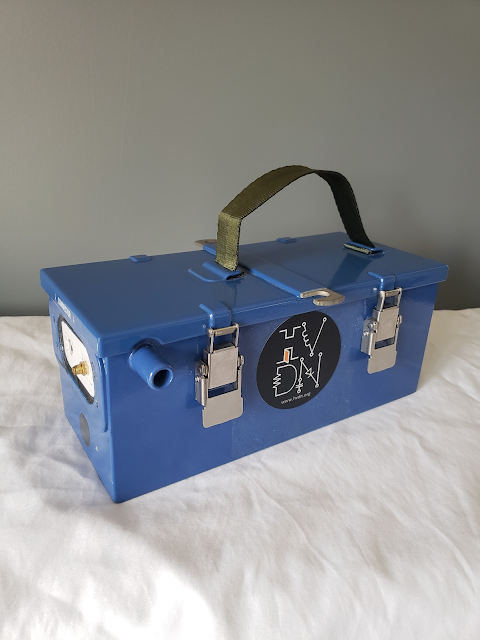
For those interested in a more complete and "professional looking" implementation of a remotely accessible SDR, Steve showed off his slightly over engineered and re-purposed example of such a device. Inside the blue commercial battery enclosure he sourced from the "maker's crown jewel for parts" of the Hudson Valley called P&T Surplus. Here is a basic block diagram inside this rugged enclosure.


mesh network aredn OSHWA Rolly Seth, Sophi Kravitz


The 12 V to 24 V DC converter is not needed for this all to work nor is the external Ethernet port or PoE splitter but were added for flexibility to use the remote SDR setup to provide power and connectivity for longer range Wi-Fi with a Ubiquiti Bullet M2 for mesh networking applications.

Power from the high capacity battery can run the basic implementation of the travel router and SDR for over seven days continually or for a few days less when using the "power over ethernet" mesh device.

All the cabling is interchangeable for easy application changes ranging from standard spade clips for DC power connections to the Ethernet and SMA antenna ports.


Using a remote SDR for IoT sensing

It is very easy to install rtl_tcp or rtl_433 onto the OpenWRT enabled router to share what is received by the SDR with any computing device that has Wi-Fi access.  

A benefit of a remote SDR is no loss of signal or more convenient placement of your IoT sensing antenna and then be able to capture, analyze and use the signals from the comfort of your kitchen table or office with no wires hanging around to trip over.

Open Source Software & SDR

The many options explored in the presentation for software are tough to capture in detail via this article summarizing the presentation, but should act as inspiration to explore Git in more depth as well as other open source software repositories as well as future articles on HVDN or presentations.

There is much to experiment with from both the hardware and software perspectives involving software defined radio and the internet of things and this presentation merely scratched the surface.

Terms like machine learning and artificial intelligence are already catching on within the SDR community as well as in IoT or open source as touched on in Steve's presentation. 


Interested in customized presentations for your group?

Since the inception of HVDN in 2017, we have supported the the Mid Hudson Valley Astronomical Society, the Squidwrench maker community,  Trenton Computer Festival and HV Open with engaging presentations to spread the word about the convergence of amateur radio with other hobby groups.

If you are interested in inviting in HVDN to give a presentation in the general Hudson Valley region of New York or slightly outside our beautiful borders, HVDN leadership can be contacted through the HVDN Notebook blog as well as via our contact page on the HVDN.org website.

SDR & IoT: Sensing the world around you with open source software presentation


Thursday, September 19, 2019

What happens when: Multiple DMR signals & SDRangel


The below video shows native DMR decoding with SDRangel software. On 427.505 MHz is an OpenSpot V1 and on 427.565 MHz is a duplex "China" Spot. 

It is very easy to leave the SDR, in this case the inexpensive NooElec Nano3 tuned to 427.565 and then toggle in the channel down to 427.505 MHz.  Both hotspots were tuned to the same talk group of 31630 during the Tuesday evening Northstar Digital Net.

One thing to notice is that the carrier time keys up quicker and also "hangs" when a discussion drops compared to the quicker times on the duplex "China" Spot.

With SDRangel, you can "run" multiple decoders for different (or the same modes) at the same time. 

You would leave SDRangel "tuned" to one frequency and you can then tune up or down from that frequency in each decoder. This will work within the SDR's capable bandwidth. In the case of the NooElec Nano3, this is 2.8 MHz. 

Also, you can "run" multiple decoders (Analog FM Narrow, DSD for digital voice, Channel Analyzer, etc) all at the same time on the same frequency to just "hear" for example the buzzzz sound of DMR via the analog FM Narrow decoder PLUS the actual DMR demodulated audio AT the same time.

There is A LOT of capability with SDRangel. Give it a try. You will like it and the ability to customize the layout to your liking for certain tasks.


Rumble: SDR# Versus SDRangel

The new "Community Plugin" option by Rodrigo Perez of SDR Chile for SDR# allows near automatic installation of more than 27 optional plug in functions to the popular software defined radio application offered by Airspy.

Upgrading versions of SDR# is now much easier for those like me who customize this software with  helpful tools such as CTCSS decoders, recording tools, signal analysis and so much more....

While all  plugins will not be useful to everyone, this does make SDR# seem fresh and able to compete with SDRangel, my favorite SDR software for off the shelf, ready to go multi purpose wireless signal exploration. Lets compare the two!

SDR# 1713+Community Package to SDRangel v4.11.9

Only very recently did Edouard F4EXB reintroduce compiled Microsoft Windows to make the use of his fantastic SDRangel software.

Attempting to compare the two is very hard, so will start with comparing the 27 plugins first against features of applicable SDRangel functions.


Lets start out with a few of the stand out plugin options that are exclusive to SDR# compared to SDRangel.

  • Plugin Calico CAT - Used for controlling radios such as the Kenwood TS-2000 
  • Plugin DDE Tracker - Dynamic Data Exchange. For those interested in scheduling activity related to tracking satellites such as weather imaging NOAA 16, 17, 19, 20. 
  • Plugin File Player - Provides the ability to play different audio or baseband files in SDR#
  • Plugin Frequency Scanner  - Offers ability to save and scan frequencies in a list
  • Plugin Gpredict Connector - Helps control satellite tracking equipment such as Az/El rotators
  • Plugin IF Recorder - Records intermediate frequency signals
  • Plugin Meteor Demodulator - Decodes Russian weather satellites
  • Plugin MPX Output - Useful for streaming FM broadcast audio with RDS signals
  • Plugin SDRSharp Net Remote -  Allows remote access and control of SDR#
  • Plugin Time Shift - Save and replay spectrum almost like a Slingbox or VCR

What is actually missing from the larger list is more detail about decoding digital voice modes such as DMR, TETRA, D-Star, Fusion/C4FM, NXDN and P25.

While the SDR# Community Plugin does add in DSD+ functionality and Tetra decoding, it is not as straight forward to use compared to SDRangel's implementation of DSD. SDRangel also adds in FreeDV and a LoRa decoder as additional "channels".

SDR# through the television plugin allows the viewing of PAL, SECAM and NTSC analog signals, whereas SDRangel only allows PAL and SECAM but also adds DATV for amateur TV enthusiasts.  These are the older analog television protocols no longer in use, so will not enable the reception of newer digital broadcast television directly with an SDR.

Final Verdict

In summary,  SDR# along with the plugin additions may create better feature sets for those interested in certain recording and signal analysis features plus better satellite related decoding or ground station control.  SDRangel does not offer any of this, but does provide some basic recording and signal analysis.

Both pieces of software really can not be easily compared since they do many things better than the other.  The big point to make is that between both pieces of software, you have almost everything one could need that appeals to a modern radio hobbyist not just looking to monitor typical amateur radio or shortwave activities which SDRuno or SDR-Console seem to appeal towards more easily.

Hopefully this article encourages further experimentation with SDR# if you have forgotten about it or have yet to try SDRangel.

Friday, July 19, 2019

Part 1: 10 GHz on a Budget


The HB100 microwave module has been around for a number of years. This inexpensive 10 GHz device is more often used as a motion detector, but is easily re-purposed as a transmitter, receiver, or both at the same time for all different types of signals, wide or narrow.

Amateur radio operators have a luxury that other hobbies that involve some form of wireless communications do not have.  With over 23,000 MHz of spectrum available via the easiest to obtain "Technician Class" license in the United States, there is a much wider world to explore.

Moving forward with amateur 3 cm band communication

Between 10,000 MHz and 10,500 is the 3 cm US technician amateur radio license band that falls into the SHF spectrum segment.

There are some interesting neighbors adjacent to the amateur spectrum according to the Federal Communications Commission (FCC) spectrum chart excerpt below just to see how in demand and valuable this spectrum is.
Here is a list of things you will need to get started to receive signals on 10 GHz:

  • Appropriate cabling to hook this all together

Above links are just suggestions. The most critical things when shopping for above include:


Power Supply: The power supply must be capable of an output of 13 and/or 18 volts. The LNB changes antenna polarization based on the voltage powering it, so a supply capable of this range is required. A fixed voltage power supply would be best however in order to not damage your LNB.  Many laptop computer power supplies can easily re-purposed for this with appropriate additional circuitry.  Just be careful when making adjustments with a variable supply as going over 18 volts may damage your LNB.

Bias T:  The RF DC Bias T allows DC power to be sent one way to power the LNB while blocking the DC power from being back fed into your USB SDR receiver.  Being sure to follow proper connection direction is critical to not damage any of your 10 GHz equipment and also, your computer which will NOT like 18 volts being sent into the SDR and possibly into your laptop USB port. It is worth noting that the RTL-SDR v3 does have a built in DC bias T, but is not capable of outputs anywhere close to what the LNB needs.

LNB:  The LNB is what converts the 10 GHz signal down to a lower intermediate frequency that can be received by your SDR between the 600 to 900 MHz range. It is far easier to send this signal over common 75 ohm coaxial cable over 100 feet into your Bias T and then into your SDR than trying to transport a 10 GHz signal cheaply. 

Beyond above three items, the appropriate cabling for power and feed lines are needed.  Do not use multiple RF adapters to change from connections like SMA to BNC to BNC to F as you will lose precious signal as a cautionary note.

Optional, but mandatory once you get things working for short range is to use this  receiver with a dish antenna, such as the easily found "Direct TV" or "Dish Network" artifacts via Craigslist, Facebook Market Place and many other local sources. The dish will help concentrate signals for longer range reception or communication.

Your finished 10 GHz receiver should look like this:


10 GHz ham radio


Software for receiving 10 GHz signals

Here are where things become a matter of preference as there are many different software packages that will work for 10 GHz.  One of the easiest programs to get working is called SDR# where a more advanced and capable application is SDRangel, which also includes native video reception.

A list of software to be mindful of includes:


sdr#, SDRangel, GNUradio, sdr


What about that HB100?

Sometimes it is easier to start with the harder part and that was the receiver component for those interested in 10 GHz signals. The good news on the transmitter part is that it is easy and cheap to make a basic transmitter capable of voice or video transmission.

Inside the HB100, is a rather simple circuit but very complex design.


All of the traces on the PCB and placement of the few components all play a part in how the HB100 actually functions. Here is a schematic description courtesy of All About Circuits.


By simply adding a signal that can ride on top of the power supply source, you can easily modulate the HB100 with either voice or video signals.

A simple circuit that provides regulated power, audio pre-amplifier and modulation for the HB100 is referenced below from the presentation "Build a simple 3cm transmitter" created by Cor Rademeyer, ZS6CR in 2018.


In the second part to this article, we will explore sending video signals with the HB100, increasing antenna efficiency and other reasons to experiment with the 10 GHz spectrum with or without your amateur radio license.


------


Some recent popular SDR related HVDN Notebook pages


Friday, May 24, 2019

LimeSDR Mini & SDR#: Yes, it works....


Of all the SDR programs, SDR# still holds a special place in my heart. Until recently, it was hard to get the LimeSDR Mini working with this versatile piece of software.

Lucky for us, Goran Radivojevic (YT7PWR) has done some recent great work to make these two software defined radio things play nice together.

Step 1:  

DownloadSDRSharpLimeSDR_v02.zipfrom https://github.com/GoranRadivojevic/sdrsharp-limesdr/releases and unzip the folder content into where your version of SDR# is found. There are 3 files:


Step 2: 

Add the following line in the frontendPlugins sections of FrontEnds.xml file:

<add key="LimeSDR" value="SDRSharp.LimeSDR.LimeSDRIO,SDRSharp.LimeSDR" />


Step 3: 

Plug your LimeSDR Mini and load SDR#.  I am using release 1700. You should see LimeSDR in your drop down options under "Sources" just like where you would select RTL-SDR (USB).


HVDN ham radio SDR


Step 4: 

Click on the gear icon to open the setting for the LimeSDR Mini and hit the "refresh" button.  You should see the details for your LimeSDR Mini come up as pictured below.


YT7PWR K2GOG


Comments:

With the LimeSDR Mini attached to a laptop via a 6 foot USB cord, reception was fine with my "test setup". The signals shown on SDR# for the curious were two of my MMDVM hotspots operating on 427.585 MHz single slot  and 427.545 MHz dual slot running DMR mode. I pipe audio out of SDR# into DSDplus, but generally I prefer the simplicity of using SDRangel for decoding digital voice modes. Dragorn of Kismet fame printed the nice case for my Lime SDR Mini a while back.

Lime SDR Mini printed case


Steve K2GOG

-----

Recent HVDN Notebook articles worth a look: 


Sunday, October 28, 2018

SSTV: Images from the ISS

Zipping around planet Earth at 220 miles above on October 27th to 29th 2018 was the International Space Station and its special series of image transmissions using amateur radio slow scan television (SSTV)


What is SSTV?

Slow Scan Television or SSTV for short is a method of sending images over very narrow wireless bandwidth with fairly good color resolution in a short amount of time.

There are many different types of SSTV signals or modes and the one currently in use by the International Space Station is known as Robot36 or PD120

145.800 MHz is the "down-link" frequency for amateur radio operation from the ISS.  Sometimes it is used for voice communication and other times it is used for experiments such as SSTV.   On 145.825 MHz is data "packet" APRS operation for two way "text message" like contact with or through the ISS>

How To Receive SSTV Images?

There are two inexpensive ways to receive and decode an ISS SSTV transmission that can be done with less than $50 of equipment, not including the cost of your computer or smartphone.

Method #1:  USB SDR Dongle & Computer Setup 
Wide band software defined radio (SDR) receivers such as the RTL-SDR v3 can be used for many things, including the reception of signals orbiting above you and around you.  
Other things you can use this 24 MHz to 1.7 GHz  "SDR" receiver for include finding your lost car key remote, monitoring smart home devices, listening to weather, music and so much more.
With free software such as SDR#, its possible to record a "visualization" of the signal for later playback and decoding of SSTV signals. The same signal can also be sent from SDR# to MMSSTV software in real time for decoding of the SSTV transmission.


Method #2:  Inexpensive VHF/UHF Hand Held Radio & Smartphone Setup 
A basic dual band hand held radio can be purchased for about the same price or less as the receive only SDR but will also offer the ability to transmit on a narrow range of amateur frequencies also used by the ISS as well as by over 2,500,000 amateur radio operators globally. 
A very simple way of decoding a SSTV transmission is to simply hold the radio next to your smartphone while running the Robot36 application found on in your favorite mobile app store. By turning the radio volume up, the microphone on your smartphone will hear the SSTV signal and decode it. Sample signals to listen to are found later in this article.
The application will decode the received audio with no physical connection to the radio which makes this very easy to demonstrate for those not very computer savvy.  

Antenna Stuff:   Very important!

While any combination of radio receiver and computing device can be used beyond the examples provided, antennas are just as critical if not more so for receiving the best signal possible.

Having what is called a good "Signal To Noise Ratio" or SNR is needed to help differentiate white noise and static from the actual SSTV signal.  Any interference to the SSTV signal will just look like static like on a television screen, so a good antenna helps increase the SNR and produce a better picture

The good new is that the ISS SSTV signal is often very strong and easy to pick up with basic antennas, but a high power directive antenna is a good idea for optimal reception since it will focus the maximum signal strength from the ISS into your radio.

The reverse polarity SMA-J connector is common on Chinese origin radios such
as those for sale by Baofeng, Wouxon and a few others. 


While good reception results will often be had with the including telescoping dipole antenna with the RTL-SDR V3 or the longer "whip" antenna included with many of the inexpensive hand held analog radios such as the UV-8, a directional antenna is a good idea to consider.

Some options that can be purchased separately made by companies such as Nagoya, Comet and Diamond are easily sourced for VHF only of VHF/UHF operation.

It is best to pay close attention to what type of connector on an antenna like this can be used with your radio as they are not all the same.

The SMA antenna connector version of this same antenna is more common for radios
\made by Alinco, Kenwood, Icom, Yaesu, TYT and Retevis.


An alternate and higher gain antenna called the tape measure yagi beam can be constructed with simple hand tools and materials for less than $20.

There is also a ready made antenna available for purchase from the Arrow Antenna Company as well as the Elk Periodic from vendors such as Ham Radio Outlet.


The beam antenna is a great club project or one for a few like minded hobbyists. Many can be constructed quickly at one time if people work together in cutting and preparing different parts of the antenna for final construction..

What does a SSTV signal sound like and how do I find it? 

In order to know what to listen for, below are three very good signals and the resultant decoded image.

Feel free to try decoding these files with the MMSSTV or Robot36 applications to get familiar with the software since you do not want to miss the fast traveling ISS the next time they are transmitting SSTV images.

The "ISS Detector" app for Android is a great way to find out when the ISS will pass over your location next.
You an also track other satellites and even planets too with this program


To find out when the ISS will be over your location next, please visit AMSAT.org for more information about tracking the ISS, satellites and other interesting space related amateur radio topics.

SSTV space station file
Play MP3 Recording:  10:28AM 10/28/2018 ISS SSTV


slow scan television amateur radio space station
Play MP3 Recording:  10:31 AM 10/28/2018 ISS SSTV

space station contact amsat SSTV ISS
Play MP3 Recording: 12:00 PM 10/28/2018 ISS SSTV

How about SSTV with an SDR?

A nice feature with the SDR# software is you can play back a recording of spectrum at any point in time.

This is also called a base-band IQ file and was discussed in prior articles about receiving voice transmissions from the International Space Station.

This file is a base-band IQ file for the "Atlantis and Mir" SSTV image to help with your own testing.


Select the  IQ file option  in SDR#
and play back the 225 MB recording 

Share your success stories, questions and comments below.  Thanks for reading!


Monday, October 22, 2018

Happy Monday Again!; Ashford School and ISS Make Contact


The front gate to Burger Hill at Drayton Grant Park in Rhinebeck, New York was closed (and locked) at 8:45 AM this morning, so a quick decision to either quickly go home or find an alternate location to record the 9:05AM rescheduled ISS contact with a school in Ashford, CT was needed.

One of the many student questions that Serena Auñón-Chancellor answered included important ion propulsion technology that may one day take Earthlings to Mars. More below including recordings!

Ion propulsion will be important in getting to Mars - Serena KG5TMT

Tracking the ISS


Orbitron software was used to track the International Space Station. Combined with the software defined radio program, SDR#, its possible to keep the frequency locked on to accommodate for slight drift called the "Doppler Effect".  At VHF ((145.800MHz), the Doppler effect is not as pronounced compared to higher frequency, such as at 445 MHz. 

\
Recording location was far from optimal for best line of site on the grounds of CO. in Rhinebeck on such short notice.

The Ashford Band YouTube channel has shared a video of the setup and ultimate discussion with Astronaut Serena Auñón-Chancellor M.D, KG5TMT.

Reception site of K2GOG in NY and KM1Z down-link site for ISS in Connecticut
YouTube link jumps to 41:50 into the 56:00 video where the actual contact between KZ1M and NA1ISS, operated by Serena.


To both see and hear the down-link signal from the International Space Station, HVDN has two files:


The HVDN files are only “one way” because line of sight from the ISS to where the recording took place was too far away from where KZ1M was located.

Here are some past articles for additional reading:


Thursday, October 11, 2018

SDR: Let's Walk To The Space Station?

I had high aspirations on Wednesday to do a base-band SDR recording of a scheduled International Space Station (ISS) contact with a school in Ashford,  Connecticut. 


Burger Hill at Drayton Grant Park Rhinebeck, NY 12572

The weather was nice, so I decided to trudge up the measly 550 feet of Burger Hill for amazing views and to maybe cross paths with a passersby or two interested in what I was up to with my collection of equipment. 
What is a base-band recording?  Think of it like recording a television show with a DVR or VCR.  The only difference is a base-band recording lets you record a wide block of spectrum say from 162 to 163 MHz and be able to point and click on any activity received for later playback. This would be like recording multiple movies, news and sitcoms on different channels all at the same time.

Bummer: Well, no activity from the ISS on 145.800 MHz at 14:39 PM ET (1839 UTC). 

As it turns out, the ISS contact was cancelled at the last minute due to an experiment in the Columbus module that would have prevented the use of the functional radio in that part of the space station. 
The radio to be used was actually considered the spare radio as the main radio after years of service no longer is functional.  A replacement is supposed to be sent up before the end of 2018.
I only found out about this change of schedule on a Facebook Group that I joined once I got home which is more up to date than all my usual sources such as the official ARISS Project website, AMSAT mailing lists and various NASA pages.


Serena Auñón-Chancellor, KG5TMT preparing the
NanoRacks Cubesat Deployer-14

This just goes to show that social media is still the best spot for breaking news!

Looking on the bright side...

All was not lost though. Not many minutes later at 15:02 ET was a pass of the elderly SO-50 satellite and I quickly made a contact with Tom, K8TL in grid EM89, 500+ miles away from me in FN31 thanks to this "repeater in the sky".
All that was needed was 1 watt of transmit power & a directional antenna! 
However, the down-link for the SO-50 satellite is centered on 436.795 MHz and there was someone using digital voice on that frequency which made it hard to make more contacts as SO-50 reached its apex and started to move out of range.

I did not have a DMR capable radio with me, but I am pretty sure that is what mode it was and it was local versus coming from the satellite. 
Listen:  Do you hear a "digital sound" on 436.795 MHz?
Trespasser!!

No hot spot or repeater stations appeared listed on Brandmeister on that frequency in the satellite band, so it could be some joker or ill informed amateur about the suggested ARRL and ITU band plan just intentionally interfering. Rhinebeck is pretty much far away from any "majorly" strong out of band signals that could have interfered, so it had to be an amateur radio operator.

I knew the signal was also local because if it was somehow coming in from SO-50 by someone transmitting DMR on the VHF up-link of 145.850 MHz, it would have come from the direction of the satellite and not from another direction to my south west at a "terrestrial" elevation.

This sort of interference makes me sad because 436.795 MHz is well known for over 16 years that this is where SO-50 transmits back to earth on.
There are plenty of other frequencies that can be used for digital voice that would not interfere with those interested in satellite communications.
Lets change the subject back to base-band

While I was at the great location of Burger Hill, I decided to do a 30 second base band recording of the weather band from 162-163 though should anyone wish to test it out since every NWS channel is in use from that location.

A "Normal" Recording:

A center frequency of 162.475999 MHz with a bandwidth of 15 kHz can easily be recorded and played back using pretty much any audio player, but only just that one frequency can be heard. The file size is 1.9 MB. Play: Standard AF Recording (1.9 MB)


Play: Standard AF Recording (1.9 MB)

A "Base-band" Recording: 


Compared to the "Standard AF Recording", the base-band recording for the same 30 seconds is 60.9 MB or 3105% larger. However, you can listen to any signal of any bandwidth in any mode across the entire 162 to 163 MHz captured for 30 seconds.


SDR# will help you visualize the entire 1 MHz wide
recording without needing a radio

In order to play the base-band file, you can not use a regular audio application or otherwise the sound might sound like an Imperial Probe Droid from Star Wars.
Play/Download:  IQ Base Band File (60.9 MB)


If you are a Star Wars fan, you know the
audio I reference from Echo Base on the ice planet Hoth

Ham Solo: Return of the SDR#

Download and install the popular SDR# program and select the "IQ File" option as shown. 
Then navigate to where the "IQ Base-band File" was saved and press play in SDR#


From the Burger Hill location and its good line of site, multiple weather stations were received as well as a few other signals not related to the weather.

nws noaa 162.475
Hudson Valley National Weather Service (NWS) stations
broadcasting 24/7 on the 162 MHz spectrum

Hopefully this article gave you a taste of a few interesting things you can do with amateur radio or use equipment for a dual purpose unrelated just to ham radio.

Next time there is a planned live ISS contact receivable from the Hudson Valley, we will definitely try to get that recording, just as long as the astronauts do not get busy at the last minute!