Showing posts with label 5.8 GHz. Show all posts

Wednesday, April 8, 2020

Mesh: Upgrade or die!


Remember those Linksys WRT54 series routers?  Please stop using them and stop buying them on E-Bay!

This article will explain why its time to upgrade or die, but just in the context of mesh networking and amateur radio through the use of AREDN and the amateur radio spectrum!


Level Up:  Mesh & AREDN

A few years ago, the only options for experimenting with modern amateur radio mesh networks were some antiquated Linksys routers and a few older Ubiquity Network devices.

Today,  these "entry level" devices are no longer very usable since they lack processor speed, on board memory and capable Wi-Fi chipsets to offer a great user experience.

Currently there are 79 different devices across 4 vendors supported by the latest version of AREDN which is v3.20.3.0.


What device should I buy?


Currently, there is only one dual band device which offers the 2 and 5 GHz spectrum and is the GL iNet GL-AR750 which sells new for under $60 USD.

Additionally, there are a total of 3 Ubiquity Networks devices that support the 900 MHz band and another 3 that offer 3.5 GHz access.

The remaining 72 devices are equally split between the 2.4/2/3 and 5.8/5/9 GHz bands.

Selecting the right antenna and deciding where or how your AREDN mesh device is a very user specific question. 

All devices offer different benefits should you need longer range, higher power, smaller size or remote operation that are far too numerous to list here, but the AREDN Forum is a great place to ask questions.


Tuesday, May 1, 2018

Bringing The Internet To A Mesh Network

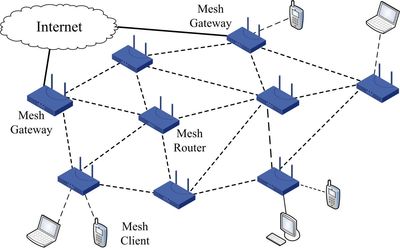
A mesh network allows network devices to extend range to end user devices over a greater area and create a better user experience compared to using network bridges or repeaters.

Super old Linksys WRT-54 series wireless routers are well known for being re-purposed as repeaters and bridges and much lower bandwidth mesh networking. Newer Ubiquiti Networks equipment offers additional functions that create even wider area high speed networks that leverage mesh technology plus easier ability to offer advertised services to users. More about that later....

Avoid older Linksys gear and purchase Ubiquiti equipment instead. Used basic "mesh" capable/compatible Linksys routers can be had for as low as $5-10/each but do not offer the features a modern person would prefer. 

The Linksys WRT-54 series of routers were first introduced 15+ years ago and there have been many versions out since.  Alternate firmware to provide more functionality has been around a long time with some of the most popular being Tomato Firmware and DD-WRT Firmware.

Upgrading Linksys to add mesh networking?

Up until a few years ago, it was possible to add mesh networking capability to these older Linksys routers, but struggled to keep up with more modern features. A lack of on-board memory limited more advanced features from being added in the firmware for mesh options such as AREDN.

The other major reason is older Wi-Fi standards such as 802.11b and 802.11g are just not speedy enough and efficient to allow for proper mesh networking to work well.  It is advised for anyone looking to experiment with mesh networking, to ignore older Linksys equipment and instead focus on Ubiquiti branded equipment instead easily sourced from E-Bay or local businesses upgrading to even newer equipment.

Ubiquiti Equipment = Better for Mesh Networking

Ubiquiti branded equipment offers 802.11n standards plus higher power output, which means greater range and speed.   Another benefit based on the chip-set used in Ubiquiti devices such as the AirRouter, Bullet, Nano, etc is the ability to choose additional channels below the standard 2.4 GHz Wi-Fi channels available to consumers.  These two other channels are part of the amateur radio only spectrum from 2.397 to 2.407 GHz. Standard Wi-Fi runs from 2.412 to 2.437 GHz.  The benefit of this spectrum is less users which means less noise/interference and slightly better range and signal quality.

Ubiquiti AirRouter HP model capable of running AREDN
mesh with other enhancements for under $50.


Mesh Networking

There is more background on mesh networking here on HVDN as well as the AREDN site.

An overlooked feature when talking about mesh sometimes is the ability to offer services or "apps" over a mesh network that are not reliant upon having access to the internet.  Having a mesh network to share just internet between different different nodes (mesh routers) and then to end use devices (cell phones) is only useful if there is internet to access information.  Without the internet, you can not do much unless there are services attached to the mesh network.

Services can be things like:

  • Cameras
  • Weather stations
  • Storage Devices (Network hard drive for file hosting)
  • Longer range communication devices (900 MHz radios, amateur repeaters, etc)
  • Informational broadcast receivers (FM, Weather, Satellite, etc)
  • Voice communications (VoIP phone)
  • Chat and file share (Text messaging, IRC and other messaging/"snapchat" sort of applications)

HVDN Mesh Chat

The HVDN offers a few services to members of HVDN, including "mesh chat" which is a messaging platform that lets users create channels and communicate across the mesh network wirelessly.

The application or "advertised service" also ties in for internet users to communicate across the mesh network as well from anywhere.


In providing a gateway from the internet into the mesh chat application will help show how useful this will be and allow HVDN to build out a wider area "wireless" component of the mesh network.

This will then to allow both internet in/out communication plus wide range communication capability should the internet not be available in the Hudson Valley.

The Major Challenge

Since mesh chat does transmit wirelessly on amateur radio spectrum, any text sent is considered a transmission and only licensed amateur radio operators can use this system.   If there was sufficient interest, a non-amateur mesh network can be set up the same way and use standard Wi-Fi channels.

Mesh chat user interface available over the internet as well as local "wireless" connection.

There are multiple security mechanisms in place to ensure that only licensed amateur radio operators use this current system, including password protection and self-identification using your amateur radio call sign.

If you would like the password to use the system, please consider joining HVDN.  Membership is free for the first year for all licensed amateur radio operators.


Saturday, March 17, 2018

Preliminary Review: Raspberry Pi 3 Model B

The Hudson Valley Digital Network aims to provide early reviews of various devices that may be of interest to amateur radio and electronic enthusiasts in and around the Hudson Valley of New York

The somewhat ubiquitous Raspberry Pi single board computer has a new model available called the Raspberry Pi 3 Model B.

The major differences between the regular Pi 3 and the new Pi 3 Model B include:


  • Added 5.8 GHz Wi-Fi in addition to the 2.4 GHz as found in its predecessor
  • Processor upgraded to the Quad Core 1.2GHz Broadcom BCM2837 64bit CPU
  • Broadcom BCM43438 WLAN includes Bluetooth Low Energy (BLE) on board
  • Wired Ethernet increases it true life throughput to 300 Mbps
  • Addition of a header to support power over Ethernet add on boards/hats

Exciting applications for ham radio

Excitement #1:  The addition of faster Ethernet and how it is implemented on the raspberry pi 3 model B may create all sorts of remote radio head applications such as a variety of software defined radio (SDR) use cases that have been constrained in the past due to the 10/100 Mbps speed limitations in prior Raspberry Pi versions. Actual throughput on the model B may reach up to 300 Mbps instead of the average 30-60 Mbps on prior models.   What is interesting is that the model B is not touting actual gigabit ethernet, but this still means the Ethernet upgrade is a good step forward and still keeping the cost down to $35 at launch time in late Q1 2018.

Excitement #2: Adding in a header for power over Ethernet support is interesting and is likely just tapping out pins 4, 5, 7 and 8 on the Ethernet port. This may frustrate some people, but it should allow for more flexibility.  In comparison, the GL iNet AR-150 has supported add on power over Ethernet which lets the user decide how they want to power the device remotely. For the Raspberry Pi 3 Model B, the user may explore powering the pi from as low as 5 volts and most likely, 12, 24 or 48 volts. 

The only problem potential is that the positioning of the header pins may get in the way of certain add on boards, but it looks easy to design into many projects and should be a non issue.  Power over ethernet will also allow more remote radio head applications when using higher frequency applications involving software defined radios.  Being able to eliminate antenna feed line loss where possible is always a good thing and the PoE edition was a smart one to make without greatly increasing costs. 

Excitement #3:  Increased wireless connectivity through the addition of 5.8 GHz and bluetooth low energy (BLE) will expand the usefulness for many applications, possibly including mesh applications. 


Processor Upgrades

With faster processor power comes increased power consumption which may limit the model B for full time powered operation compared to remote battery operation.  The increased processor speed and quad core architecture will enable more intensive  loads such as higher bandwidth SDR and various digital voice applications related to DMR, NXDN and P25. 

Discuss your next Pi project?

Have a look at the HVDN Activity calendar for related moderated discussions around computing and embedded computing to find out where others may be talking about the Raspberry Pi 3 Model B in the coming weeks. 


If you know of additional discussions taking place not already listed on the calendar, please make a suggestion to have something added.