Friday, December 31, 2021

K2GOG EOY 2021 Loose Ends #3: MMDVM Pi-Star + RPI Zero 2 W Upgrade


My primary duplex hotspot was last reconstructed all the way back in 2018 and has been reliable at home or for select field demonstrations ever since.

Beyond swapping out the SD card and upgrading the firmware, nothing from a basic hardware perspective has changed for almost five years.

With some spare time today as the year comes to a close, it was time to finally upgrade the Raspberry Pi Zero W v1.1 to the newest Raspberry Pi Zero 2 W released earlier in the year as part of my N5BOC based duplex hotspot.
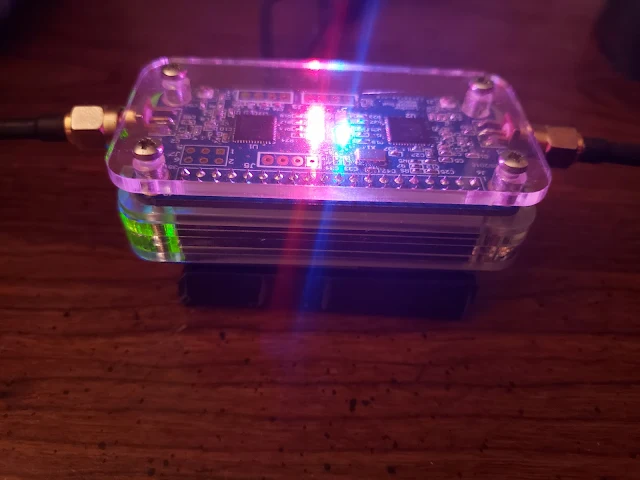
N5BOC, K2GOG, MMDVM Duplex,  Pi-Star Duplex
We have the blinky blinks with the hotspot which means its working!
(Photo Credit: Steve Bossert K2GOG)

Computing Differences

As the Pi-Star software package has continued to evolve, it has become evident that the older Raspberry Pi Zero was underpowered with its single core CPU.  

The new Raspberry Pi Zero 2 W has a total of four CPU cores certainly will add more horsepower behind the scenes to my hotspot.

I am expecting a noticeable power consumption increase due to the additional computing power, so this is something I will need to analyze further if I want to take this unit portable.

Raspberry Pi Zero Wireless 2 offers 4 CPU cores which is 3 more than the earlier version. The prominent RF shielding over the Broadcom chip is a notable addition on this latest board which will be popular with the digital voice community looking to upgrade MMDVM hotspots
(Photo Credit: Raspberry Pi Foundation)


Power of the Pi

My N5BOC duplex board has been surrounded by one of the C4 labs laser cut cases for a long while.

Sometime in 2019, I made the addition of a PiSugar battery pack to the bottom of my hotspot to give it some back up and limited portable power.  

This small battery pack is also part of the HASviolet project, so that is why I had a few more on hand.

I am not expecting this this small 3.7v 1200 mAh battery will last now, so will have to do some tests.  

The reason I like using a PiSugar is that if by chance there is a power surge since I operate a hotspot remotely, this gives me some additional protection. 

PiSugar battery pack
(Photo Credit:  PiSugar Git Page)


From a full charge when running the older RPI Zero, I would get about 4 hours run time, so I am expecting maybe half that with the more power hungry RPI Zero 2.

The normal USB power supply  at home I use is rated at 5 amps, so I will have to consider doing some measurements on current draw over the next few weeks to see how the RPI ZW2 compares to the older RPI ZW1.  

Surgery Upgrade

If you have experience with the C4 Labs cases, you probably know it took practically no time to solder on a new 2x20 header to the RPI Zero 2 compared to putting the case back together.

No changes to my SD card image needed to be made which was already running the latest version of Pi-Star. I simply put the SD card into the new RPI and everything worked right away after connecting to the new IP address.


N5BOC, K2GOG, MMDVM Duplex,  Pi-Star Duplex
While running "sudo pistar-update" after moving to a fresh install
of Pi-Star on a Raspberry Pi Zero Wireless 2
(Photo Credit:  Steve Bossert K2GOG

Then there was a problem....

While I did run "sudo pistar-update" and "sudo pistar-uprade" on the RPIZW1 prior to switching over to the new RPIZW2, after an initial play around, I ran into an issue when doing same update/upgrade on the RPIZW2 and needed to start with a fresh install of Pi-Star in the end since I could not log back in are connect over LAN.

Lessons learned over the years, when in doubt if you can not solve the issue in under 10 minutes, just start with a fresh pi-star image.


N5BOC, K2GOG, MMDVM Duplex,  Pi-Star Duplex
Ran sudo pi-star update for a second time to ensure all packages were up to date
(Photo Credit:  Steve Bossert K2GOG)


So, I ended up flashing a fresh version of Pi-Star and did the upgrade and update paths and ran into no issues. I suspect there was something with a buster based dependency issue or kernel specific anomaly. 

I would suggest just starting from scratch in my opinion to remove any gremlins that will happen at an inconvenient time. 

Keep running sudo pistar-update and or upgrade until everything seems fine before you go and program the pi-star specific things you need like frequency, modem, callsign, etc.


N5BOC, K2GOG, MMDVM Duplex,  Pi-Star Duplex
Even though everything was thought to be current after moving to Raspberry Pi Zero Wireless 2,  running sudo pi-star upgrade uncovered some additional packages needed by the newer Raspberry Pi.
(Photo Credit: Steve Bossert K2GOG


Was it worth it?

For $14.99 thanks to a recent trip to Micro Center, the upgraded horsepower now part of my Pi-Star MMDVM N5BOC hotspot seemed like it was a great idea.


K2GOG duplex hotspot made from a N5BOC duplex board,  Raspberry Pi Zero Wireless 2 and a PiSugar battery all contained in a C4 Labs case. One of the USB wires is for power that plugs into the PiSugar. The one is for a GPS that plugs into the OTG port on the RPI Zero Wireless 2.  External 433 MHz mini mag mount antenna are connected via the SMA ports.
(Photo Courtesy:  Steve Bossert K2GOG)


Wednesday, December 29, 2021

K2GOG EOY 2021 Loose Ends #2: Battery Upgrade


With a few less days in 2021 remaining, I was hoping to upgrade the batteries in a pair of  "vintage" Yaesu VX-1R over the holiday break, but still find myself waiting on the replacement 14650 cells to arrive. 

So for now, this project is on hold while my batteries which were ordered on December 17th should have shipped today, but have not yet status updated! 

Memory Lane: The Yaesu VX-1R

All the back in 1997, this micro-miniature amateur radio came to market with its 500mW of RF output in the 2m and 70cm spectrum bands when using the internal battery. And, plugging the radio into an external DV 6 V source provides up to 1W of RF output.

With wide analog reception from 76 to 999 MHz with few gaps, this was an interesting radio, along with some experimental AM broadcast band coverage too.

This was also my third ever amateur radio handheld, so I have always had a fond memory of it and was glad to find two at reasonable price while at the NEARFEST in Deerfield, NH this past October.

Even today when compared side by side with a modern radio like the Alinco DJ-MD5XTG, its amazing how advanced the Yaesu VX-1R was almost 25 years ago for an analog only transceiver for its size.


Spending upwards of $30 USD today for a replacement battery in 2021 is a tough sell for an older radio like this which sells for about $50 to $75 used almost 25 years after its release.

The optional FBA-20 AA battery holder accessory has become harder to find, so the cheapest way to bring new life to these great little radios is by rebuilding the original battery.


The original Yaesu FNB-52LI battery is rated at 3.6v at 700 mAh and the inside of each battery has a charge controller and lithium 14650 cell. 

Versions of the 14650 are available today in 1100 mAh capacity, although some vendors boast of some with 1600 mAh which is not very believable.

After putting four old cells in the freezer for a few hours, I was able to use a hobby knife to slice down the side of each battery and reveal the insides.


A curious thing was that all four batteries on the outside appear identical, but one of them uses a slightly different charge controller as shown below.  

Functionally, they are probably all the same and the date codes all seem around the same manufacturer period but this was interesting to see.


So when the new 14650 batteries arrive, it will be a pretty easy replacement process by swapping the old cells for the new and reattaching the charge controller before stuffing it all back inside the original casings. Will probably print some nice new labels including date codes too while I am at it.

Other battery projects

I think once I finish up the Yaesu VX-1R battery rebuilds, I will try and tackle the same idea for some other vintage radios from the late 1990's too, but those will require some more thinking as they all originally used NiCd or NiMH chemistry and I rather make everything run on lithium cells instead. 

Do you have any similar projects in mind?   Drop come comments below if you do.

Friday, December 24, 2021

K2GOG EOY 2021 Loose Ends #1: Charting Work Bench Lighting


While at the Fair Lawn Amateur Radio Club (FLARC) hamfest back on June 5th 2021, I acquired some 4 foot long LED lighting strips that were part of some type of dismantled commercial display.  

The seller of these usually brings some "scrap" material from his day job and this was not the first time I bought something from this person, whose name escapes me at the moment.

It took until October to find a use for one of these LED strips after realizing that I needed a little more light than my two ring lights can offer while doing work bench videos that I did not want any shadows on.

K2GOG small project bench lit up with only the LED strip under the support shelf 
(Source: Steve Bossert K2GOG)

K2GOG small project bench showing the LED panel installed under the shelf.
(Source: Steve Bossert K2GOG)

Now with three sources of light on my "only small projects" work bench, I figured it would be handy to measure how much light is cast by this new under shelf fixture.

K2GOG 2021 Loose Ends:  Measuring Lux

Fast forward until the last days of 2021 when I have some spare time to knock out a few random projects.

A benefit of using a variable voltage bench supply with a serial output means I can do some nice real world data visualization with a practical purpose. 

Additionally, I also used a multimeter that can measure voltage, current and lux but not all at the same time for this article.

Sigrok is a very good open source application if you have a bench supply, oscilloscope, multimeter or other test equipment that you want to combine with your computer for data capture or logging if it can export its reading via a serial connection.


Scientific Process Commence! 

In chart 1 below you can see on the Y axis, the current draw and on the X axis, the voltage in 0.5 increments required by the LED strip.

Once I hit about 7 to 7.5 volts, the LED strip became dimly lit and its current draw is almost logarithmic as I increased voltage, but with a few fluctuations if you look closely as I stepped through the measurement process.

Had I run this test setup at maybe 0.1 or 0.2 volts per step, it may have been a little more accurate but had I run the test at 1 volt steps, a good bit of data would not have been shown. 

All I  really wanted to find was the "sweet spot" for voltage and current via a dedicated full time power source for the optimal level of light. And I found that easily after looking at this chart I created! 

Chart 1 - Y axis = current and X axix = voltage
(Source:  Steve Bossert K2GOG via Sigrok and a supported power supply) 

Past 20 volts, the current continued to climb but there was no benefit to moving past that point from the perspective of light output so is why the chart stops at 20 volts. The heatsink on the LED strip certainly got warm to the touch when drawing more than 3 amps too! 

We have the light!

Looking at the below chart 2, the X axis again shows voltage in 0.5 steps and the Y axis now shows approximate lux (lx) as measured by the ambient light sensor compatible with one of my Sigrok compatible multimeters.  

Please note the lux sensor stayed at a fixed location 14 inches below the center of the LED strip for all voltage comparison measurements. I am also not endorsing the accuracy of these lux measurements as all I needed were relative approximate lux measurements and not something that was lab grade accurate.

Chart 2 - Y axis = lux and X axix = voltage
(Source:  Steve Bossert K2GOG via Sigrok and a supported DMM)

As charted above, going past 16.5 volts does not give much benefit in terms of light output compared to the additional current draw.

And now the solution

So for a dedicated full time power supply, I will re-purpose an old laptop supply rated at 3 amps at 19 volts along with a pair of step down converters to give me a high and low light capability.

The high setting provides 16 volts and the low setting is set for 10 volts which gives me roughly 3x difference in light output.

Hope you enjoyed this loose end and to inspire you to try something like this.  And, if you were wondering, I kept some details like which power supply, multimeter, step down converters, etc out of this article on purpose so you can do some of your own research and to not promote specific vendors.

Happy Holidays! ~7 more days until 2022!

Thursday, December 23, 2021

2021: HVDN Notebook Year In Review


K2GOG, HVDN, Steve Bossert

2021 for many was another tough one, but there were some bright spots through the HVDN lens worth sharing as we get ready to enter a hopefully more positive 2022.

2021 Most Popular HVDN Notebook Articles

Our top most read articles in 2021 is an interesting mix of both old and new.   

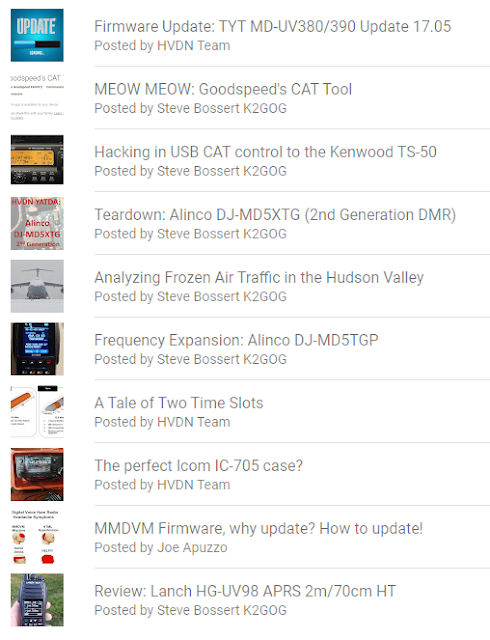
Leading the list is the "Firmware Update: TYT MD-UV380/390 Update 17.05" article first published on August 20th 2018. 

A good guess as to why this continues to be so popular is that the TYT website continues to not be stable when it comes time to download firmware or that resellers that do host similar files, offer little help on a radio that is still sold four years later.


HVDN, ADS-B, Kenwood, Alinco, Icom, Yaesu, Anytone, amateur radio, preppers, hudson valley hikers, hudson valley ham radio


Another article from 2018 that saw a resurgence of interest is the June 12, 2018 "A Tale of Two Time Slots" which is probably worth an update. 

More people learn about the benefits of DMR and the ability to maximize use of its spectrum benefits compared to other digital voice modes, so this is good to see as finally being popular!

Also from 2018 is the Joe Apuzzo N1JTA "MMDVM Firmware, why update? How to update!". 

While some of the information is dated, the major benefit of this article is the still accurate list of  commands used to update your MMDVM firmware in one nice and easy copy and paste format.

Back in October 2019, the "Review: Lanch HG-UV98 APRS 2m/70cm HT" authored by Steve Bossert K2GOG has continued to grow and drive sales for a product which the manufacturer has since closed its website. 

The products main reseller continues to offer excellent support and sales along with a growing user community who appreciate what this radio offers to those interested in low cost APRS.

APRS, HVDN, HG-UV98

Articles from last year proved popular for another year and it seems like the December 7th 2020 "Teardown: Alinco DJ-MD5XTG (2nd Generation DMR)  led the pack but was tightly related to another 2019 Alinco article called "Frequency Expansion: Alinco DJ-MD5TGP" also in the top ten list for 2021.

This leaves us with four 2021 released articles which were very popular and it seems that Kenwood needed some positive vibes since they continue to shrink its amateur radio portfolio.  

The super popular Kenwood TH-D74 which suffered a supply chain driven manufacturing stop oddly coincided with a major hack on this radio as detailed by the "MEOW MEOW: Goodspeed's CAT Tool" article from August 1st.  

With used radios now selling for more than they did new, Kenwood has even stopped letting anyone download the v1.11 firmware directly from its website, but will kindly give you access if requested along with a stern warning. 

It sure seems that "someone" got a little too close for comfort with this radio while poking around, but hopefully Kenwood comes out with something even more amazing in 2022 to fill the gap.


Another article which made a nice but quick splash was the modification of the "Hacking in USB CAT control to the Kenwood TS-50" which got highlighted by Hackaday soon after its release on January 11th 2021.


If you ever wondered why Hackaday is so great at driving awareness, here is how the traffic looked for just this one article 

HVDN

Closing things up about the Top 10 HVDN Notebook articles in 2021 enjoyed by our readers was the "Perfect Icom IC-705 case?" from back in April which will have an update to coincide with Winter Field Day 2022.

Lastly, the "Analyzing Frozen Air Traffic in the Hudson Valley" article from February which saw an interesting double dip of interest, thanks to our good friends over at the RTL-SDR.com blog

HVDN

Happy Holidays from HVDN and here is looking forward to 2022!

Friday, December 17, 2021

Making SDR easy with SIGpi


Do you have a Raspberry Pi 4 that needs a new use?  Have you wanted to run your RTL-SDR V3, HackRF, Lime SDR or other SDR on something other than a dedicated computer?  Are you afraid of the word "dependency" when it comes time to compile applications on Linux? Would you like to be able to better sense the RF world around you?

If you answered yes to any of those questions, SIGpi is going to be worth paying attention to.  What Joe Cupano NE2Z has done is created a set of automated installation scripts and menu system to allow for easy automated installation of many popular software defined radio applications and optimized a few things to run on Raspberry OS 64-bit (or 32-bit) systems.

Quick Dare To Compare

Dragon OS is a precompiled Linux operating environment along with many popular SDR and related applications which is quicker to get started with compared to SIGpi.

The major benefit with SIGpi is user customization for what you wish to install as the main applications.  And, when it comes to to update applications like SDRangel or SDR++ as example, a script called "pusher" allows the prior version to get updated to the latest version without breaking dependencies.

Beyond many of the visual applications that may be of interest to those interested in "signal interception" work, many command line and other applications of interest to wireless network or amateur radio professionals are also included.

These are some of the user experience driven benefits of what makes SIGpi unique and beneficial to different users and for those with different levels of technical abilities.

Pre-Education: Getting Started with SIGpi

Go ahead and grab your favorite SDR device which is NOT one of the SDRplay devices and install a fresh copy of either the 32 or 64 bit version of Raspberry OS onto a new 32GB or larger SD card.

A few quick notes:

  • Performance will be better under the 64 bit based Raspberry OS, so you need to decide that now.
  • If you decide to use the 32 bit version, a program called Artemis will be able to better function
  • Artemis is an offline signal analysis database application which has samples of different signals and frequency uses to help determine likely digital mode signals you may come across.

Once you have your fresh SD card ready with Raspberry OS version of choice, it would be a good idea to enable SSH support for later ease of access. 

Enabling SSH access on a Raspberry Pi likely is something our readers should be aware of already.

After you log in to your Raspberry Pi for the first time with the generic credentials,  it may also be a good idea to sudo raspi-config and also enable VNC support for further headless access.

SIGpi has intentionally turned off Wi-Fi interface, so you can also choose to turn that back on if you like while you are in raspi-config when connected over LAN.

A Few Easy Steps

There are only a few steps you need to do now that you have your Raspberry Pi 4 that is hopefully connected to the internet now to now move towards getting SIGpi installed and you have already completed the usual apt-get update and apt-get upgrade sequences.

Below in green are the commands needed via terminal to get ready for SIGpi. Details are also in the Git repository page here.

First, you will need to run sudo apt-get install -y build-essential cmake git .  This will add some other important pieces to your stock Raspberry OS installation.

Next,, you will need to mkdir ~/SIG && cd ~/SIG in order to create the directory where SIGpi will end up and also automatically move you into that directory for our next step.

Use this opportunity now, if not already, to make your terminal screen full screen on your computer which will be helpful for some later steps.

The third thing to run via your terminal is:

git clone https://github.com/joecupano/SIGpi.git

This important step will clone the Git repository for SIGpi to your Raspberry Pi.

Finally, all you have to do now is cd SIGpi so that you can run the set up script for SIGpi.

./SIGpi_installer.sh

Now here is where the fun begins. Once you run the ./SIGpi_installer.sh and if everything was followed up until this point, you be greeted with a screen like this now in your terminal:


After using your tab key to allow you to hit enter, your next step will be to select the base applications for your installation.  

A 32GB SD card at minimum is suggested for further expansion, but if you wish to use a 16GB card, you can select the options in this article to help keep your installation a little smaller for now.


The reason why we are providing an option for two versions of GNUradio is based on user preference.

 Some people may prefer to still use the older 3.8 version since the architecture for 3.9 changed a bit. For most people who are interested in the more visual applications for SIGpi,  either is fine and 3.8 may be fine for now.


In this step, your base visual SDR applications can be installed and we suggest getting familiar with SDRangel and also SDR++.  Lighter weight applications like GQRX and CubicSDR are provided as options for convenience.

This step will be of more interest to amateur radio people interested in some digital modes specific to those activities mostly. 

You can decide to always come back to install these if you like, but they are all pretty small and could not hurt to include all five in your initial installation.


This selection of useful applications will appeal to different people for different reasons. Some may already be familiar to some readers, but Artemis might be new as well as the HVDN HASviolet project which we snuck in here as well.  

At any point after initial installation you can add these, but if you have a 32GB card or greater, it is more than ok to just select all of these and move on.

It is worth noting that the popular rtl_433, dump1090, radiosonde and a few other command line applications are already going to install automatically since they are small, but we chose to only highlight the larger applications in this menu tree for installation.


And now you are ready to hurry up and wait. Once you move past this menu, you will start to see a flurry of activity taking place with critical milestones highlighted during installation to know what steps you are up to.  


Depending on your options selected, the total installation for the first time will take up to three hours in total.  As the SIGpi progresses you will see colored bars like above letting you know what is comping up and what has just finished installation.

If you decide to include SDRangel, the wisdom files included for FFT will be worth the wait given all the underlying dependencies that F4EXB and his community have built into this great application. 

The Artemis application and hamlib will also take a while, but as long as you can leave your Raspberry Pi connected to the internet and you can check in on it from time to time via your terminal, everything should run pretty smoothly. 

Installed. Now what?

Suggestion from here is to just VNC into your Raspberry Pi and you will be greeted with some localization steps for Raspberry Pi like setting up a keyboard, time zone and warned that now is a great time to change the default password from "raspberry" to something else.

Once you have a look at the menus in the Raspberry OS, you will see many fun things to play with and explore signals around you.


A last recommendation before we close this article is that it is a good idea to plug your SDR into the Raspberry PI 4 USB 3.0 port (the blue ones!)  to get more bandwidth for your SDR.

Perhaps starting with SDR++ or SDRangel is what got you excited, so hope you enjoy SIGpi.

When it comes time to update to a later version of the applications installed, you can learn about how to do that by visiting the SIGpi Git repository.

Future video, article, etc coming up to help better understand how to actually use the software and also how to update things when its needed with SIGpi. 

https://github.com/joecupano/SIGpi


Monday, December 13, 2021

More Results: Tri-State NVIS Exercise


THIS ARTICLE WAS ASKED TO BE REMOVED 

A CURATED COPY CAN HOWEVER BE FOUND IN OUR MEMBERS ONLY AREA

FURTHER DETAILS CAN BE FOUND HERE

THANK YOU

Friday, December 10, 2021

SHF Ham Radio: No, not SHTF!


Icom engineers are working hard to research and develop a number of never cleared challenges within the SHF band, such as large cable loss and higher frequency stability requirements. The ultimate goal is to bring it to the market as a new radio product.

SHF is short for Super High Frequency is used to describe 3 to 30 GHz spectrum and not the much (much) lower high frequency (HF) spectrum  from 3 to 30 MHz makes up less than 0.0163% of all available amateur radio spectrum.

I just want to buy something, not make it!

If companies are looking for more opportunity, they can make amateur radio products that can be used on more of the total 23,126.7731 MHz of spectrum available to amateur radio operators.

Icom is striving to bring to you a new era in fun and possibilities of an SHF band amateur radio, which to date has had high technical and equipment hurdles to overcome, and they hope to make these bands more attractive and active so that anyone can easily operate on them. 

For anyone interested in the other spectrum available such as the 13cm (2400 MHz), 9cm (3400MHz), 3cm (10 GHz) and 1.2cm (24 GHz) plus more so feel free to check out this article and spectrum database for United States Amateur's.


Sadly, the 9cm band has already been lost to commercial users in the last few years because amateur radio was not using this as much as they should.

Thanks Icom for giving this a try and we look forward to what you bring to market! 


Wednesday, December 8, 2021

On the map: 80m HV Net


3835 kHz has seen an uptick in use over the past few weeks across the Hudson Valley and beyond, thanks to some organizing efforts of Paul AC2UQ and many who have participated.

Moving forward, each Wednesday at 4:30 PM local Hudson Valley time is when to give a listen to the 80m spectrum and decide to participate or just lurk in the background.

Finding ways to promote readiness and willingness to be part of different "on air" activity is important for the health of the amateur radio hobby.

Calling All Radio Amateurs

There are many different things which appeal to "ham radio" operators and its fun to make use of our spectrum locally to see what works and what does not when it comes to reliable communications that do not use any man-made devices in between such as a repeater, a satellite or the internet.

Winter is fast arriving in the Hudson Valley and now is the time to check your antennae or put up a new one to see whats happening on 3835 kHz.

Look out on the HVDN Activity calendar for other regional on the air and off the air activities.


Monday, December 6, 2021

Results: Tri-State RACES NVIS Exercise


THIS ARTICLE WAS ASKED TO BE REMOVED 

A CURATED COPY CAN HOWEVER BE FOUND IN OUR MEMBERS ONLY AREA

FURTHER DETAILS CAN BE FOUND HERE


THANK YOU